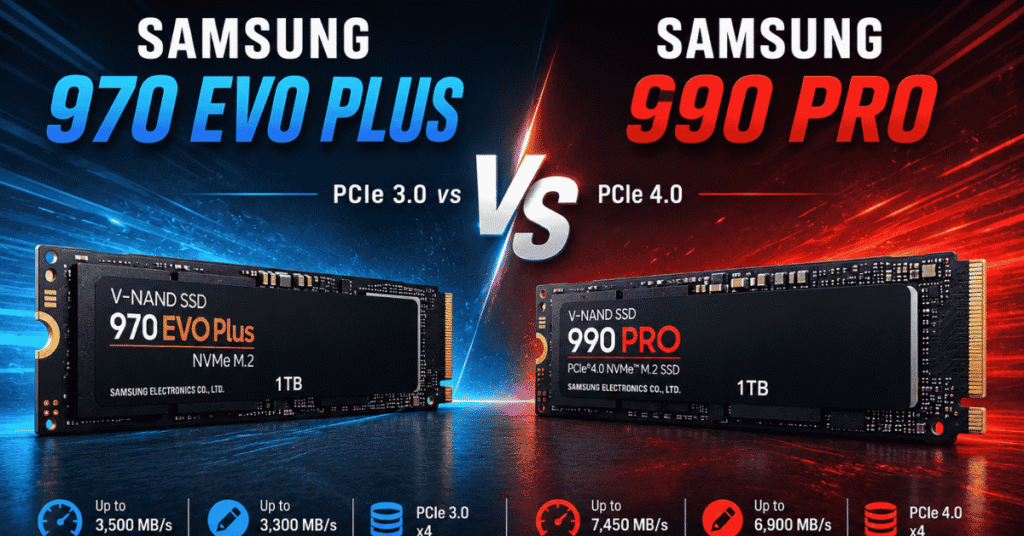
Samsung 970 EVO Plus vs 990 Pro: Both are high-end NVMe M.2 SSDs from Samsung, but they’re from different generations. The 970 EVO Plus uses PCIe 3.0, while the 990 Pro moves to PCIe 4.0 and offers roughly twice the sequential read and write speeds on paper.
That makes the 990 Pro the obvious winner if you only look at the specifications. But that’s not the whole story.
If you’re buying a new SSD and your PC supports PCIe 4.0, the Samsung 990 Pro is the better choice. If you already own a 970 EVO Plus, however, upgrading isn’t automatically worth the money. For Windows, everyday applications, and most gaming, the difference between the two is much smaller than the benchmark numbers suggest.
Here’s what you actually need to know before choosing one.
Samsung 970 EVO Plus vs 990 Pro: Specs at a Glance
| Feature | Samsung 970 EVO Plus | Samsung 990 Pro |
| Interface | PCIe 3.0 x4, NVMe 1.3 | PCIe 4.0 x4, NVMe 2.0 |
| Form factor | M.2 2280 | M.2 2280 |
| NAND | Samsung V-NAND TLC | Samsung V-NAND TLC |
| DRAM | Yes | Yes |
| Sequential read | Up to 3,500 MB/s | Up to 7,450 MB/s |
| Sequential write | Up to 3,300 MB/s* | Up to 6,900 MB/s |
| Warranty | 5 years | 5 years |
| Best for | PCIe 3.0 systems and everyday use | New PCIe 4.0 systems and demanding workloads |
*The maximum write speed of the 970 EVO Plus varies by capacity. Samsung rates the 1TB and 2TB models at up to 3,300 MB/s.
The numbers make the generational difference look huge. The 990 Pro can reach more than twice the sequential read speed of the 970 EVO Plus, thanks largely to its PCIe 4.0 interface. Samsung rates the 1TB 990 Pro at up to 7,450 MB/s read and 6,900 MB/s write.
But don’t assume that means your PC will suddenly feel twice as fast.
What’s Changed from the 970 EVO Plus to the 990 Pro?
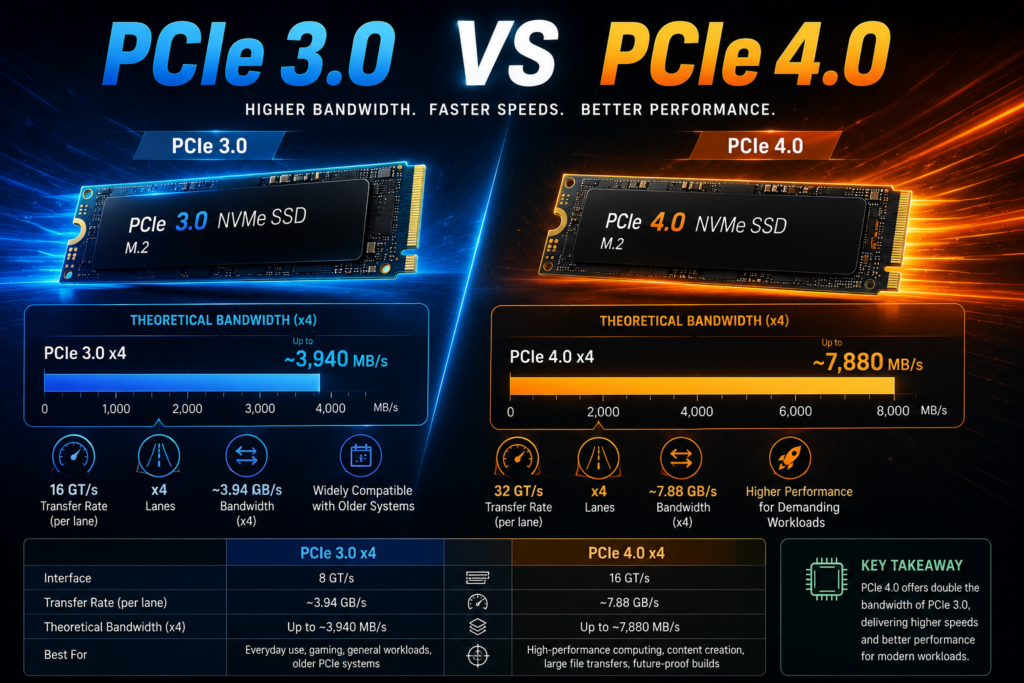
The biggest change isn’t simply a newer controller or faster NAND. It’s the move from PCIe 3.0 to PCIe 4.0, let alone PCIe 4.0 vs 5.0.
The 970 EVO Plus uses a PCIe Gen 3.0 x4 interface, while the 990 Pro uses PCIe Gen 4.0 x4. Both are M.2 2280 drives and use Samsung’s V-NAND with DRAM.
That extra bandwidth gives the 990 Pro much more room to stretch its legs.
The 990 Pro Is Much Faster on Paper
The difference is easy to see in sequential workloads:
- 970 EVO Plus: up to 3,500 MB/s read and 3,300 MB/s write
- 990 Pro: up to 7,450 MB/s read and 6,900 MB/s write
So if you’re copying large files, working with high-resolution video, or running other storage-heavy workloads, the 990 Pro has a clear advantage.
But sequential speed isn’t the whole SSD experience.
Opening Chrome, launching an application, booting Windows, or loading a typical game doesn’t involve one continuous stream of data at the drive’s maximum sequential speed. Those tasks rely heavily on smaller, random accesses and overall system responsiveness.
That’s why a benchmark result that looks twice as fast doesn’t necessarily translate into a twice-as-fast PC.
Performance: How Much Faster Is the 990 Pro in Real Use?
This is where the comparison becomes more interesting.
If you’re replacing a hard drive with either SSD, you’ll notice a major improvement. If you’re replacing a 970 EVO Plus with a 990 Pro, the improvement is much more subtle.
Windows and Everyday Applications
For normal desktop use, the 970 EVO Plus is still a very capable SSD.
Windows should boot quickly, applications should open without much delay, and everyday tasks such as browsing, document work, and photo management won’t suddenly become twice as fast with a 990 Pro.
If your 970 EVO Plus is healthy and has enough free space, there’s little reason to replace it solely because the 990 Pro has a much higher advertised read speed.
This is one of those situations where a faster benchmark doesn’t necessarily mean a worthwhile upgrade.
Gaming
The same idea applies to gaming.
The 990 Pro is the faster drive, but replacing a 970 EVO Plus won’t double your FPS. The graphics card and CPU remain far more important to frame rates.
The SSD can make a difference in loading games, installing them, moving game files, and handling other storage-intensive tasks. The 990 Pro can be faster in these situations, but the improvement from an already-fast NVMe SSD such as the 970 EVO Plus is usually much smaller than the jump from an HDD to an SSD.
For a new gaming PC with PCIe 4.0 support, I’d choose the 990 Pro if the price makes sense. For an existing PC that already has a 970 EVO Plus, upgrading only for gaming performance is harder to justify.

Large File Transfers and Heavy Workloads
This is where the 990 Pro makes a stronger case.
If you regularly work with:
- 4K or 8K video files
- Large project files
- Disk images and backups
- Large software builds
- Virtual machines
- Frequent large file transfers
the 990 Pro’s higher bandwidth can be useful.
The difference matters most when you’re moving enough data for the SSD’s sequential performance to matter.
For a workstation that spends a lot of time reading and writing large files, the 990 Pro is the more appropriate drive.
Your Motherboard Matters More Than You Think
Before buying the 990 Pro, check what PCIe generation your M.2 slot supports.
The 990 Pro is designed for PCIe 4.0 x4. A PCIe 3.0 system can still use a PCIe 4.0 SSD in a compatible slot, but the drive won’t reach its full PCIe 4.0 performance.
That changes the buying decision considerably.
If Your PC Supports PCIe 3.0
The 970 EVO Plus makes more sense if you’re specifically looking for a fast PCIe 3.0 SSD.
You can install a 990 Pro in a compatible older system, but you’re paying for performance that the platform may not be able to use.
If Your PC Supports PCIe 4.0
The 990 Pro is the better fit.
You get access to its much higher sequential performance, making it a more sensible choice for a new system or a substantial storage upgrade. Samsung lists the 990 Pro for client PCs and game consoles and rates it for up to 7,450 MB/s sequential reads and 6,900 MB/s writes.

Should You Upgrade from the 970 EVO Plus to the 990 Pro?
This is probably the most important question in this comparison.
Keep the 970 EVO Plus if:
- Your PC mainly handles everyday tasks.
- You mostly browse, work, stream, and use standard applications.
- You use the PC primarily for gaming.
- Your motherboard only supports PCIe 3.0.
- Your current SSD has plenty of free space.
- You would have to spend a significant amount of money for the upgrade.
If that’s your situation, there’s nothing wrong with keeping the 970 EVO Plus. It may be an older-generation drive, but it is still a fast PCIe NVMe SSD.
Upgrade to the 990 Pro if:
- You are building a new PC with PCIe 4.0 support.
- Your current SSD is running out of space.
- You regularly move very large files.
- You edit high-resolution video.
- You use virtual machines or other storage-heavy workloads.
- You want a faster primary drive and can get the 990 Pro at a reasonable price.
There’s also a simple rule worth remembering:
If you’re replacing the SSD anyway, get the newer 990 Pro. If your 970 EVO Plus is working well, don’t replace it just to chase benchmark numbers.
Endurance: Does the 990 Pro Last Longer?
Both drives are designed for long-term use and come with a five-year limited warranty.
The rated endurance depends on capacity. For example, Samsung rates the 1TB 970 EVO Plus at 600 TBW, while the 1TB 990 Pro also carries a 600 TBW rating. The 2TB 970 EVO Plus is rated at 1,200 TBW.
So endurance isn’t a compelling reason by itself to replace a 970 EVO Plus with a 990 Pro.
And TBW shouldn’t be interpreted as a countdown to failure. A 600 TBW rating doesn’t mean the SSD will suddenly stop working after exactly 600 TB of data has been written. It is an endurance rating associated with the drive’s warranty and expected workload.
For normal desktop and gaming use, endurance shouldn’t be the deciding factor between these two drives.
Which One Should You Buy?
The answer depends largely on whether you’re buying new or upgrading an existing system.
🚩Choose the Samsung 990 Pro if:
- You’re building a new PCIe 4.0 PC. There’s little reason to choose an older PCIe 3.0 drive when the price difference is reasonable.
- You work with large files. The 990 Pro’s higher sequential performance helps with demanding storage workloads.
- You want the faster drive and plan to keep it for years. The 990 Pro gives you substantially more bandwidth for future workloads.
🚩Choose the Samsung 970 EVO Plus if:
- You already own one. For everyday use, there’s no urgent reason to replace it.
- Your system is limited to PCIe 3.0. The 990 Pro won’t reach its full potential.
- You find a significantly better deal. If the 970 EVO Plus is considerably cheaper and your workload doesn’t need PCIe 4.0 speeds, saving the money can be the smarter choice.

Samsung 970 EVO Plus vs 990 Pro: Pros and Cons
🚩Samsung 970 EVO Plus
| Pros | Cons |
| Still fast for everyday use | Much lower sequential speeds than the 990 Pro |
| PCIe 3.0 x4 with TLC NAND and DRAM | Doesn’t take advantage of PCIe 4.0 bandwidth |
| Strong endurance ratings | Less attractive for a brand-new PCIe 4.0 build |
| Excellent fit for older PCIe 3.0 systems | |
| Usually more than fast enough for gaming and general use |
🚩Samsung 990 Pro
| Pros | Cons |
| Much higher sequential read and write speeds | More expensive than older PCIe 3.0 drives |
| PCIe 4.0 x4 interface | Needs a PCIe 4.0 platform to reach its full potential |
| Strong performance for demanding workloads | Everyday users may not notice a dramatic difference over the 970 EVO Plus |
| Better choice for new PCIe 4.0 systems | |
| Five-year limited warranty |
Samsung 970 EVO Plus vs 990 Pro: Final Verdict
The Samsung 990 Pro is the better SSD, but it’s not automatically the better upgrade.
If you’re buying a new SSD for a PCIe 4.0 system, I’d choose the 990 Pro. It is significantly faster in sequential workloads and makes better use of a modern platform.
But if you already have a 970 EVO Plus, don’t feel pressured to replace it simply because the 990 Pro has much higher benchmark numbers. For Windows, everyday applications, and most gaming, the 970 EVO Plus remains fast enough that the difference may not justify the cost of upgrading.
The biggest reason to move to the 990 Pro is not simply that it’s newer. It’s that you have a workload—or a new PCIe 4.0 system—that can actually take advantage of its additional bandwidth.
Buying new: Samsung 990 Pro.
Already own a 970 EVO Plus: Keep it unless you need more capacity or regularly perform demanding storage workloads.
FAQs
Is the Samsung 990 Pro much faster than the 970 EVO Plus?
On paper, yes. The 990 Pro is rated for up to 7,450 MB/s sequential reads and 6,900 MB/s writes, compared with up to 3,500 MB/s reads and 3,300 MB/s writes for the 970 EVO Plus.
However, everyday performance does not scale directly with sequential benchmark speeds. The difference is much more noticeable in large-file and storage-heavy workloads than in basic desktop use.
Is it worth upgrading from a 970 EVO Plus to a 990 Pro?
For most everyday users, not necessarily. If your 970 EVO Plus is healthy and you mainly use Windows, applications, and games, the upgrade may not feel dramatic. It makes more sense if you need additional storage or regularly perform demanding workloads.
Is the 990 Pro good for gaming?
Yes. The 990 Pro is an excellent gaming SSD, but don’t expect it to increase your FPS. Its main advantages are faster storage transfers and potentially shorter load times. If you already have a 970 EVO Plus, upgrading solely for gaming is unlikely to provide a dramatic improvement.
Can I use a Samsung 990 Pro in a PCIe 3.0 slot?
A PCIe 4.0 SSD can operate in a compatible PCIe 3.0 system, but it will be limited by the available PCIe 3.0 bandwidth. If your system is PCIe 3.0-only, the 970 EVO Plus may be the more sensible choice.
Should I buy the 970 EVO Plus or 990 Pro for a new PC?
If your new PC supports PCIe 4.0, choose the 990 Pro if the price fits your budget. The 970 EVO Plus makes more sense when you’re working with a PCIe 3.0 platform or when you find it at a substantially lower price.