Choosing backup software is not simply about finding the program with the longest feature list. The more important question is how well the software fits the way you use and protect your PC.
EaseUS Todo Backup vs Macrium Reflect is a particularly interesting comparison because both products cover the core areas of modern Windows data protection, including file backup, system imaging, recovery, and disk cloning. However, they approach backup from slightly different angles.
- EaseUS Todo Backup is positioned as a broader data protection solution, with separate editions for free users, home users, and businesses.
- Macrium Reflect also has dedicated products for personal and business environments, with a strong focus on disk imaging, recovery, and backup management.
Quick Verdict
So, which one should you choose in 2026?
For most individual users who want an accessible backup solution covering everyday files, Windows systems, recovery, and occasional disk migration, EaseUS Todo Backup is the more versatile choice. Macrium Reflect is particularly compelling for users who prioritize advanced imaging and recovery workflows and want extensive control over how backups are created and restored.
EaseUS Todo Backup vs Macrium Reflect: Quick Comparison
| Category | EaseUS Todo Backup | Macrium Reflect |
| Main focus | Data backup and protection | Backup, imaging, and recovery |
| Free edition | ✅ | ❌ |
| Home edition | ✅ | |
| Business edition | ✅ | |
| File backup | ✅ | |
| System imaging | ✅ | |
| Disk/partition backup | ✅ | |
| Incremental backup | ✅ | |
| Differential backup | ✅ | |
| Scheduled backup | ✅ | |
| Disk cloning | ✅ | |
| Recovery environment | ✅ | |
| Ransomware/backups protection | ✅ | |
| Best suited to | Home users through businesses | |
Both can protect an entire Windows installation, back up individual files, create disk images, and clone drives. The difference becomes clearer when you look at their product structure and typical use cases.
EaseUS Todo Backup: A Broader Data Protection Approach
EaseUS Todo Backup is best understood as a data protection suite. Its core purpose is to protect data and systems against events such as hardware failure, accidental deletion, system crashes, and other forms of data loss. Disk cloning is included as one of the tools users can turn to when they need to migrate or duplicate storage.
The product is currently divided into three major editions:
- EaseUS Todo Backup Free for users who need basic backup and recovery capabilities without purchasing software.
- EaseUS Todo Backup Home for individual and family users who need more advanced backup, recovery, and migration features.
- EaseUS Todo Backup Enterprise for businesses and organizations that need to protect workstations, servers, databases, and business-critical data.
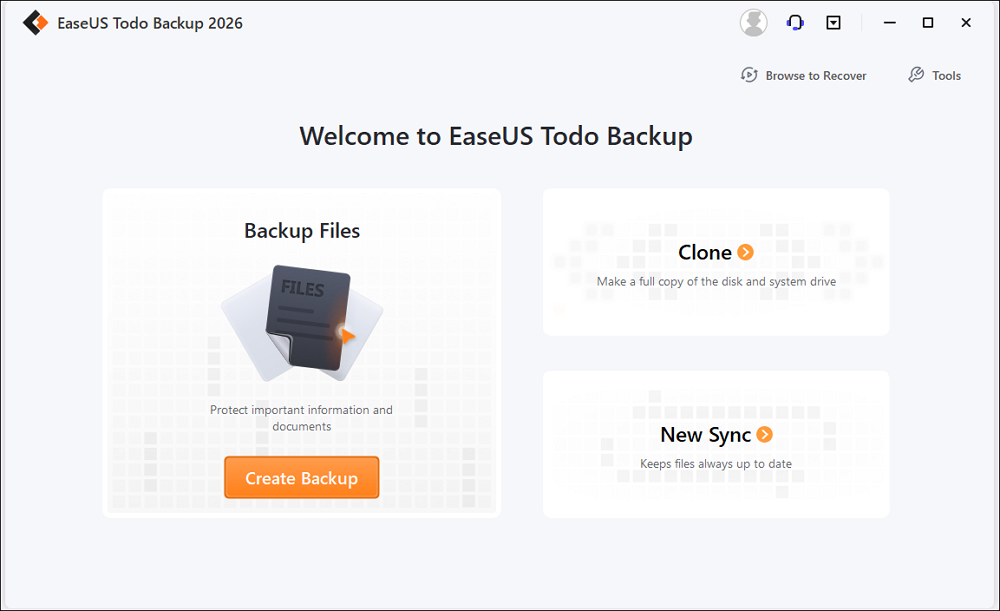
The Free edition already supports important backup functions such as incremental and differential backups, basic scheduling, and Cloud backups, and multiple backup destinations. Disk and partition cloning are also available, while more advanced capabilities are provided in higher editions.
The Home edition expands the product into a much more complete personal backup solution. Besides the above free functions, it also supports disk/partition clone, encrupted clone, transfer OS to different PC, and universal restore.
For businesses, EaseUS Todo Backup Enterprise goes considerably further. Its capabilities include server protection and specialized backup for environments such as Microsoft SQL Server and Exchange Server, alongside centralized data protection requirements.
Macrium Reflect: Imaging and Recovery at Its Core
Macrium Reflect has built a strong reputation around disk imaging and reliable system recovery.
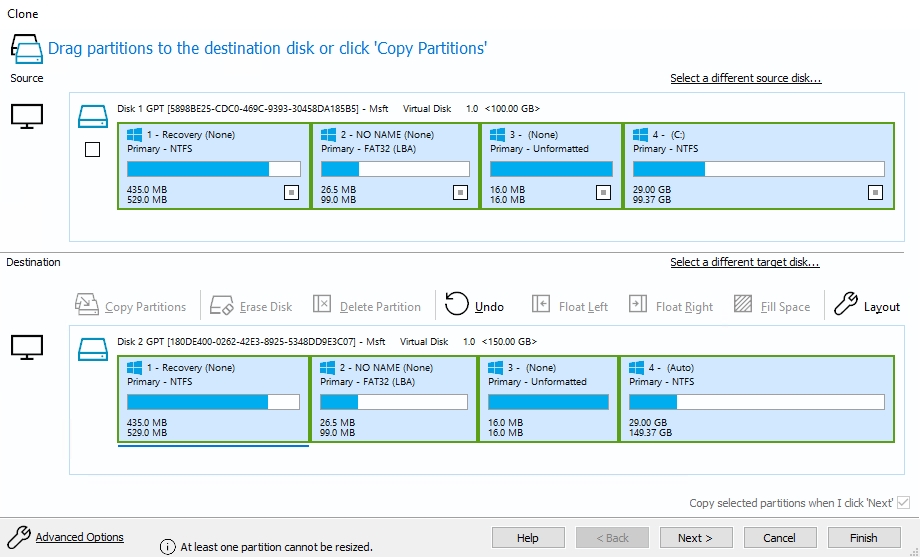
Its current Home product is based on Reflect X technology and emphasizes fast backups, Rapid Delta Restore, resumable imaging, ransomware protection, and broad device compatibility, including ARM-based systems.
The product also has a dedicated business lineup designed for organizations that need scalable backup, recovery, and deployment solutions. Macrium Reflect is not simply a “clone your hard drive” application. Its strongest identity is as an imaging and recovery platform.
You may want to read: Macrium Reflect Review
EaseUS Todo Backup vs Macrium Reflect: Which Has Better Backup Features?
At the basic level, both products cover the essential backup methods most Windows users need.
- Full Backup: Both can create comprehensive backups of files, partitions, or entire systems.
- Incremental and Differential Backup: Both support backup strategies that avoid repeatedly copying unchanged data. EaseUS Todo
- Scheduled Backup: Scheduled backups are critical because a backup that depends entirely on remembering to run it manually is easy to neglect. They support daily, weekly, and monthly scheduling.
- System Recovery: Both products can create recovery environments that allow users to restore a Windows system when the operating system itself cannot boot.
- Backup Security: EaseUS Todo Backup supports password-protected backups and offers a Security Zone feature in higher editions. Macrium Reflect provides Image Guardian to help protect stored backup images from unauthorized modification.
At this point, neither product has an obvious knockout advantage. The more meaningful differences emerge when considering which edition you need, how much control you want, and how you expect to use the software.
EaseUS Todo Backup vs Macrium Reflect: Which One Is Easier to Use?
EaseUS Todo Backup generally prioritizes simplicity. Its main workflows are presented around familiar tasks such as Backup, Recovery, Clone, and Tools. A user can create a backup task without understanding image files, retention rules, or complex recovery configurations.
Macrium Reflect provides more detailed controls. This is useful for experienced users who want to fine-tune backup definitions, retention policies, imaging behavior, and recovery environments. However, that flexibility can also make Reflect feel more technical to someone who has never configured a disk image before.
Pricing and Value
Price should be considered alongside the type of protection you need.
A free backup solution can be perfectly reasonable for someone who only needs basic file and system protection. Paying for a Home edition becomes easier to justify when you need more advanced backup management, recovery capabilities, or continuous protection.
For businesses, the calculation changes completely. The cost of losing business data, experiencing extended downtime, or failing to recover a server can be far greater than the software license itself.
This is why both EaseUS and Macrium maintain separate business-oriented product lines.
Macrium’s professional reputation and advanced imaging capabilities make it attractive to organizations that already rely on its ecosystem. EaseUS’s multi-tier structure, meanwhile, lets organizations select an edition according to their infrastructure and protection requirements.
The best value therefore isn’t necessarily the software with the lowest price.
It’s the software that provides the right level of protection without unnecessary complexity or cost.
Which One Should You Choose?
Instead of declaring one product universally better, choose according to your situation.
| Better Fit | Why recommend | |
| I need basic free backup | EaseUS Todo Backup Free | Broad essential backup features |
| I want automatic PC protection | EaseUS Todo Backup Home | Designed for ongoing home backup |
| I want backup + cloning in one tool | EaseUS Todo Backup Home | Combines both workflows |
| I’m upgrading an SSD | Either | Both support disk cloning |
| I want advanced disk imaging | Macrium Reflect | Strong imaging and recovery focus |
| I need detailed recovery controls | EaseUS Todo Backup Home | Extensive recovery configuration |
| I’m new to backup software | EaseUS Todo Backup | More approachable workflow |
| I manage business systems | Enterprise/Business editions | Designed for organizational requirements |
| I only need occasional disk migration | EaseUS Disk Copy | Dedicated cloning workflow |
Final Verdict
For most individual Windows users, however, the decision comes down to simplicity versus control.
If you want to establish a backup strategy without spending a lot of time learning complicated imaging workflows, EaseUS Todo Backup is the more approachable choice.
If you already understand disk imaging and want deeper control over how backup and recovery work, Macrium Reflect is worth considering.
And if you only need to clone a drive during an SSD upgrade, neither product’s full backup capabilities may be necessary. A dedicated cloning solution such as EaseUS Disk Copy can be a more focused choice.
Ultimately, the best backup software is not the one with the longest feature list. It’s the one you can configure correctly, run consistently, and rely on when your original data is no longer available.