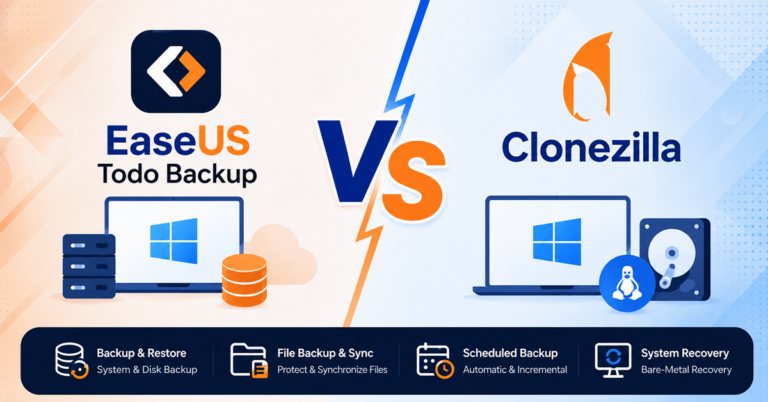
EaseUS Todo Backup and Acronis True Image are both established backup and recovery products, but they approach data protection from somewhat different directions. EaseUS Todo Backup focuses on backup, recovery, cloning, and file synchronization, while Acronis True Image has expanded backup into a broader cyber-protection package that includes security and cloud services.
This comparison looks at their current pricing, core capabilities, and practical use cases to help you decide which one fits your needs.
Key Takeaways
- EaseUS Todo Backup is a strong fit for users who primarily need Windows backup, recovery, disk cloning, and file synchronization.
- Acronis True Image is better suited to users who want backup combined with broader cybersecurity and cld features.
- EaseUS offers a free edition, while Acronis True Image is sold through annual subscriptions.
- Acronis has an advantage if you specifically need integrated anti-malware, ransomware protection, cloud storage, Microsoft 365 backup, or broader cross-platform support.
EaseUS Todo Backup vs Acronis True Image: Quick Comparison
| Category | EaseUS Todo Backup | Acronis True Image |
| Primary focus | Backup, recovery, cloning, and sync | Backup, recovery, cloning, and cyber protection |
| Free edition | ✅ | ❌ |
| File backup | ✅ | ✅ |
| System/image backup | ✅ | ✅ |
| Disk/partition backup | ✅ | ✅ |
| Incremental/differential backup | ✅ | ✅ |
| Disk cloning | ✅ | ✅ |
| File synchronization | ✅ | ✅ |
| Cloud backup | Supported | Integrated Acronis Cloud on eligible plans |
| Anti-ransomware protection | Backup-focused protection | Integrated |
| Anti-malware | ❌ | ✅ |
| Microsoft 365 backup | ❌ | ✅Available on Advanced/Premium |
| Windows support | Windows | Windows and macOS |
| Consumer pricing | Free; Home from $39.95/year | Essentials from $49.99/year |
| Business editions | Workstation, Server, Advanced Server, Technician | Separate Acronis business products |
| Best suited for | Users prioritizing backup, recovery, cloning, and sync | Users wanting backup plus broader cyber protection |
What Is the Difference Between EaseUS Todo Backup and Acronis True Image?
At a basic level, both applications can create backups and restore them after a failure. Both can also create disk images and clone drives. The difference becomes clearer when you look at what each product is designed to do beyond those fundamentals.
EaseUS Todo Backup: Backup and Recovery First
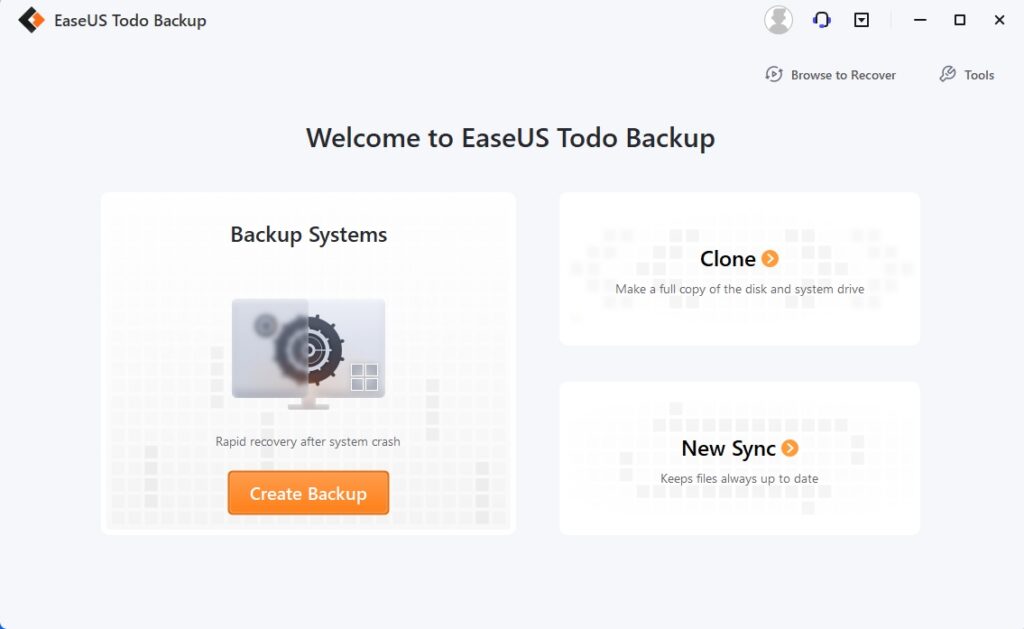
EaseUS Todo Backup is primarily a data protection and recovery tool. Its core functions include file, system, disk, and partition backup, incremental and differential backups, scheduled backups, recovery, and disk or system cloning. The free edition already provides several of these fundamental backup capabilities, while Home adds advanced functions such as cloning.
The Sync feature is different from traditional backup. Instead of creating a backup image that you restore later, Sync keeps files or folders synchronized between two locations. It supports one-way and two-way synchronization.
Overall, EaseUS Todo Backup makes the most sense when your priority is a relatively direct set of data-protection tasks: back up your PC, recover it when necessary, clone a drive when upgrading hardware, and synchronize important files between locations.
Acronis True Image: Backup Plus Cyber Protection
Acronis True Image covers many of the same fundamental backup functions, but its current product positioning goes further.
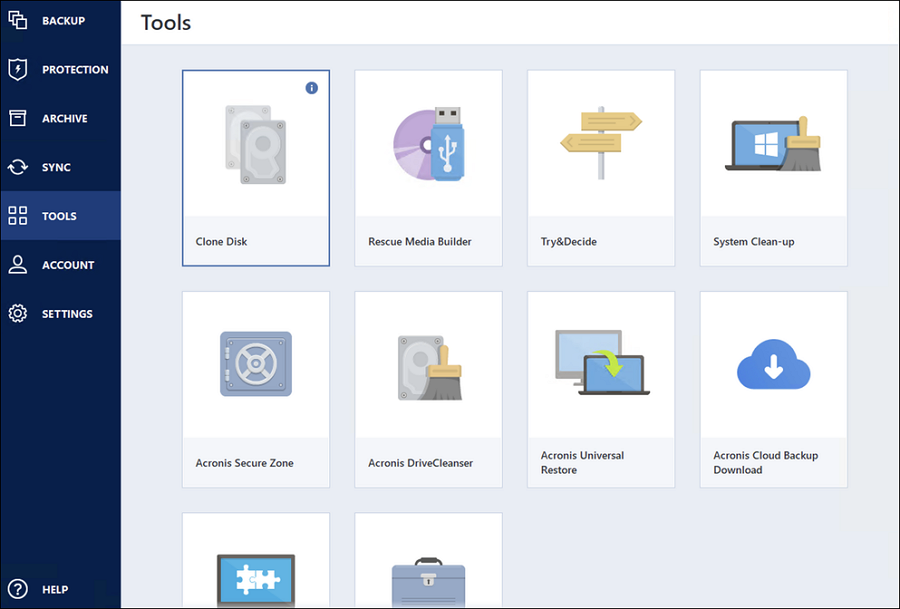
Its feature set combines backup, disk cloning, recovery, cloud storage, and security features. Depending on the subscription, Acronis includes capabilities such as anti-ransomware protection, anti-malware protection, vulnerability assessment, Microsoft 365 backup, and cloud backup.
That makes Acronis less of a pure backup utility and more of an all-in-one cyber-protection application for personal devices.
That is the key distinction:
EaseUS Todo Backup concentrates on protecting and recovering your data, while Acronis True Image combines data protection with a broader security and cloud-services package.
EaseUS Todo Backup vs Acronis True Image: Pricing
Price is one of the clearest differences between the two products, but comparing the headline price alone can be misleading. The more useful question is: What does each price actually include, and will you use those included features?
EaseUS Todo Backup Pricing
EaseUS currently offers several consumer options.
The Free edition provides core backup and recovery functions, including file, disk, partition, and system backup, as well as full, incremental, and differential backup options.
For Home users, the current listed prices are:
| EaseUS Todo Backup Home | Listed price | License |
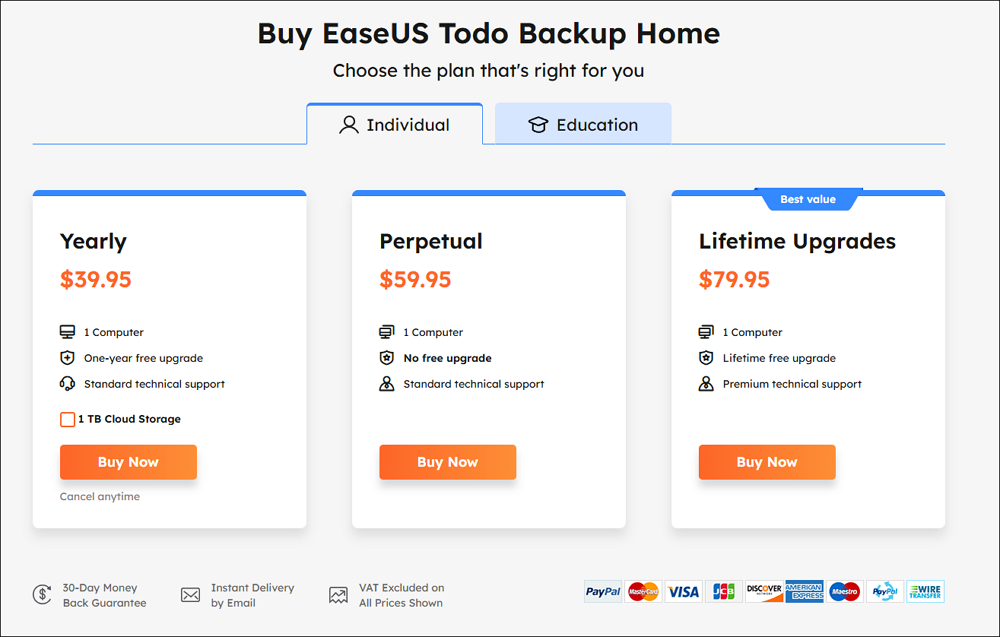
| Yearly | $39.95/year | 1 computer |
| Perpetual | $59.95 | 1 computer |
| Lifetime Upgrades | $79.95 | 1 computer |
The yearly plan currently includes one year of free upgrades, while the $79.95 Lifetime Upgrades option includes lifetime free upgrades and premium technical support. The Home purchase page also currently lists 1 TB cloud storage with the yearly plan.
The exact price can change with promotions, regional pricing, or special offers, so it is better to treat these figures as current reference prices rather than permanent prices.
For businesses, EaseUS has separate Workstation, Server, Advanced Server, and Technician editions. These add capabilities such as Windows Server backup, SQL and Exchange backup, centralized management, and other business-oriented functions.
Acronis True Image Pricing
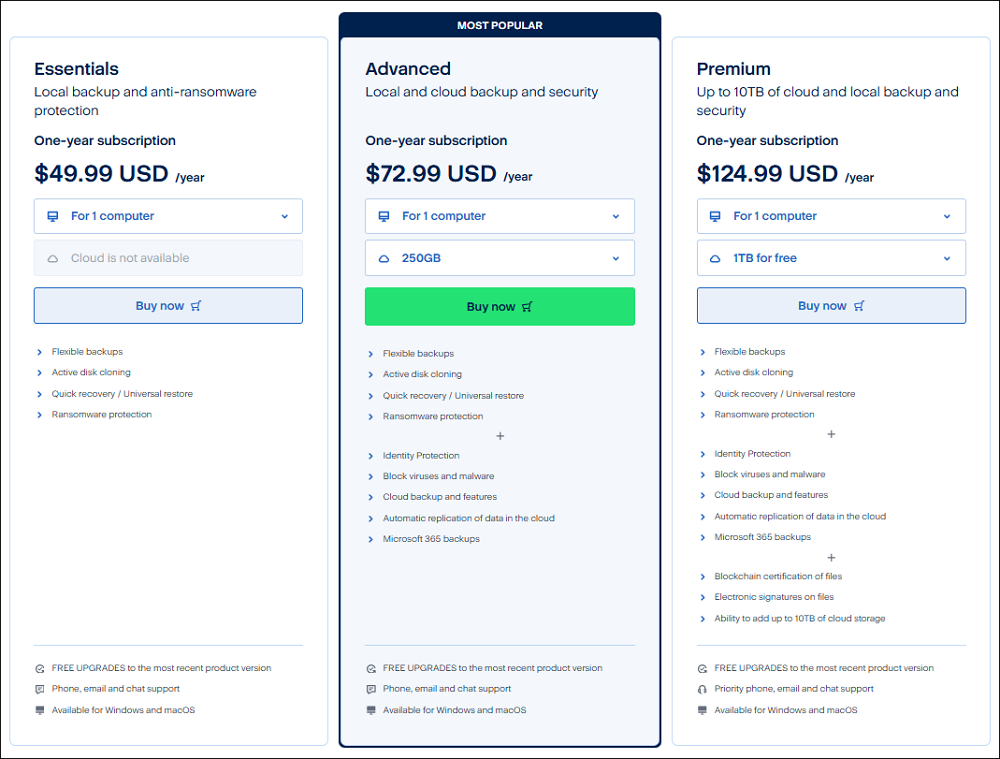
Acronis True Image currently uses an annual subscription model for its consumer plans.
| Acronis True Image | Starting price | Cloud storage |
| Essentials | $49.99/year | None |
| Advanced | $72.99/year | 50 GB |
| Premium | $124.99/year | 1 TB |
All three consumer plans cover up to five PCs/Macs and an unlimited number of mobile devices. Essentials focuses on core backup, cloning, and basic anti-ransomware protection. Advanced adds features such as cloud backup, full anti-malware protection, and Microsoft 365 backup, while Premium adds more cloud storage and additional support benefits.
This makes the pricing comparison more nuanced than simply saying that Acronis is more expensive.
EaseUS Todo Backup vs Acronis True Image: Which Is Better for Different Users?
There is no single answer for every backup scenario. The following use cases provide a more practical way to choose.
1. Free Backup
👍Better fit: EaseUS Todo Backup
This is one of the clearest differences. EaseUS Todo Backup has a Free edition that supports core file, system, disk, and partition backup and recovery. It also supports full, incremental, and differential backup strategies.
Acronis True Image is positioned as a paid subscription product, with Essentials currently starting at $49.99 per year.
2. Windows PC Backup
👍Better fit: EaseUS Todo Backup for straightforward backup needs; Acronis for users who also want integrated security.
The decision comes down to what you want around the backup.
Choose EaseUS Todo Backup if your workflow is:
Create a system backup → store it on another drive/NAS/cloud → schedule future backups → restore when necessary
Use Acronis if your workflow is:
Back up the PC → store backups in the cloud → protect the device against ransomware and malware → back up Microsoft 365
3. Disk Cloning
👍Best fit: Depends on the use case.
If the main job is replacing drive and want to move existing system to the new one, either product can fit.
If cloning is only one part of a broader backup strategy, EaseUS can be attractive because Todo Backup combines cloning with backup, recovery, and synchronization.
If cloning is part of a broader security and cloud-protection setup, Acronis may make more sense.
If disk cloning is literally the only thing you need, however, a dedicated disk cloning tool may be a more focused choice than buying a full backup suite.
4. Cloud Backup
👍Better fit: Acronis for integrated cloud storage, EaseUS for users who prefer flexible storage choices.
Acronis integrates its own cloud storage into its Advanced and Premium plans. Current plans include 50 GB with Advanced and 1 TB with Premium, with additional storage available depending on the plan.
EaseUS Todo Backup supports backup to cloud storage and other destinations, including local drives, external drives, NAS, network locations, and cloud storage.
This gives users different approaches.
Choose Acronis if you prefer:
- Backup software + cloud storage + security in one subscription.
Choose EaseUS if you prefer:
- A backup application that can work with different storage destinations and does not require every part of your backup strategy to come from the same vendor.
EaseUS’ current Home yearly plan also lists 1 TB of cloud storage, so users should check the exact plan terms when comparing costs.
5. Cybersecurity and Ransomware Protection
👍Better fit: Acronis True Image
Acronis True Image integrates anti-ransomware and anti-malware capabilities into its broader protection platform. Depending on the plan, users can also access vulnerability assessments, web filtering, antivirus scanning, and other security functions.
If you already have a separate antivirus or endpoint-security solution and only need reliable backup, the additional Acronis security features may be less important.
EaseUS Todo Backup vs Acronis True Image: Key Differences
The easiest way to summarize the comparison is by looking at what each product prioritizes.
| EaseUS Todo Backup | Acronis True Image | |
| Basic backup | Strong | Strong |
| System/image backup | Strong | Strong |
| Disk cloning | Strong | Strong |
| File synchronization | ✅ | ✅ |
| Backup destinations | Local, external, NAS/network, cloud | Local, external, Acronis Cloud and other supported destinations |
| Free option | ✅ | ❌ |
| Entry price | Lower | Higher |
| Cloud storage | Available depending on plan | Integrated in Advanced/Premium |
| Anti-malware | No | Integrated on eligible plans |
| Ransomware protection | No | Integrated cyber protection |
| Best value for simple backup | EaseUS | — |
| Best for integrated cyber protection | — | Acronis |
| Best for a focused Windows backup workflow | EaseUS | — |
| Best for multi-device protection | — | Acronis |
You may be interested: EaseUS Todo Backup vs Macrium Reflect
Which One Should You Choose?
Rather than choosing based on an overall winner, start with your actual requirements.
Choose EaseUS if:
- You primarily use Windows.
- You want a free backup option.
- Your main requirement is file, system, disk, or partition backup.
- You need disk or system cloning.
- You want file synchronization between folders or storage locations.
- You prefer local, external, NAS, network, or cloud backup destinations.
- You want to keep the cost of backup software relatively low.
- You already use separate antivirus or security software.
- You do not need a large collection of integrated cyber-protection features.
For these users, paying extra for a broader security platform may not provide much additional value.
Choose Acronis if:
- You want backup and cybersecurity in one application.
- Ransomware and malware protection are important parts of your backup strategy.
- You want integrated Acronis Cloud storage.
- You need Microsoft 365 backup.
- You manage Windows, Mac, and mobile devices.
- You want a single subscription covering several types of personal devices.
- You prefer an all-in-one approach rather than combining separate backup, cloud, and security services.
In these situations, the higher subscription cost can be easier to justify because you are using more of the capabilities included in the package.
Final Verdict
EaseUS Todo Backup and Acronis True Image are both capable backup solutions, but they are increasingly aimed at somewhat different priorities.
EaseUS Todo Backup is the more straightforward choice for users who primarily want backup, recovery, cloning, and file synchronization. Its free edition makes it accessible for basic Windows backup, while its paid Home edition adds more advanced capabilities. It is particularly appealing when you want control over where your backups and synchronized files are stored without necessarily needing an integrated cybersecurity suite.
Acronis True Image is better suited to users who want backup as part of a broader cyber-protection package. Its combination of backup, cloning, cloud storage, anti-ransomware protection, anti-malware capabilities, and multi-platform support can justify the higher subscription cost for users who will actually use those features.
So, if your question is “Which one is better?”, there is no universal winner. The right choice is therefore less about picking the product with the most features and more about paying for the protection you actually need.