Avast vs Windows Defender is one of the biggest antivirus debates for Windows 11 users. With Microsoft Defender now built directly into Windows and offering dramatically improved security, many users are wondering whether third-party antivirus software is still necessary.
At the same time, Avast continues to attract users with advanced features like ransomware protection, VPN services, privacy tools, and enhanced web security. So which antivirus actually offers better protection, performance, and value in 2026?
In this guide, we compare Windows Defender vs Avast across malware detection, system performance, privacy, pricing, ransomware defense, and backup protection to help you decide which solution is best for your PC.
Avast Antivirus vs Windows Defender: Quick Comparison
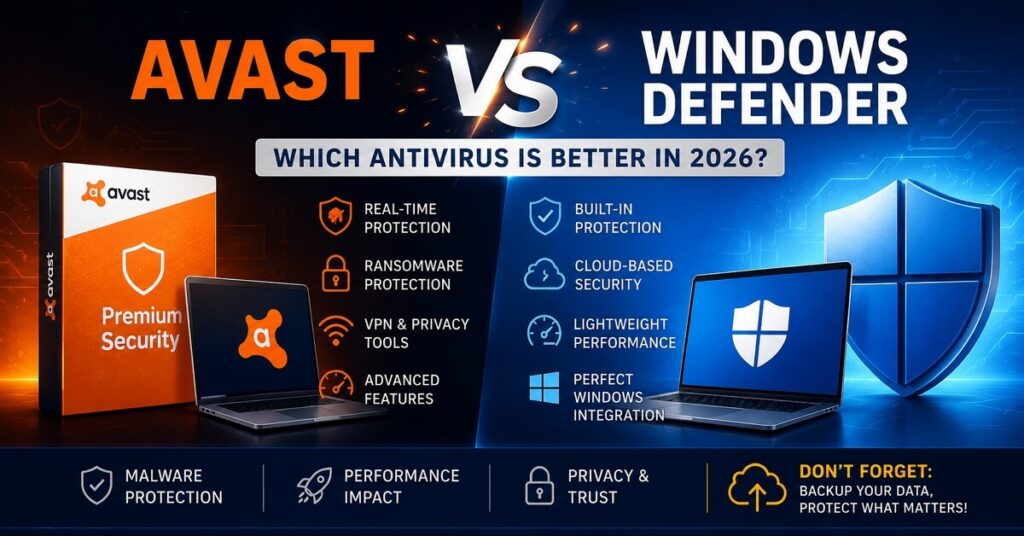
Before diving into detailed testing results and feature breakdowns, here’s a quick overview of how Avast vs Windows Defender compares in the areas that matter most to Windows 11 users.
While both antivirus solutions provide solid real-time protection, they target different types of users. Windows Defender focuses on simplicity, lightweight performance, and built-in security, whereas Avast offers more advanced tools for users seeking additional privacy and ransomware protection.
The table below highlights the key differences between Avast and Windows Defender.
| Feature | Avast | Windows Defender |
|---|---|---|
| Real-time Protection | Yes | Yes |
| Built into Windows | No | Yes |
| Ransomware Protection | Advanced | Basic |
| VPN | Available | No |
| Password Manager | Yes | No |
| Firewall | Premium only | Included |
| Ads/Popups | Frequent in free version | None |
| Performance Impact | Moderate | Lightweight |
| Price | Free + Paid Plans | Free |
| Best For | Advanced users | Most Windows users |
What Is Windows Defender?
Windows Defender, now officially called Microsoft Defender Antivirus, is Microsoft’s built-in security solution for Windows PCs. Unlike traditional antivirus software, Defender comes pre-installed with Windows 10 and Windows 11. There’s nothing extra to download, configure, or subscribe to.
It includes:
- Real-time malware scanning
- Cloud-based threat detection
- Firewall protection
- SmartScreen phishing protection
- Basic ransomware defense
- Automatic security updates
For casual users, Defender works silently in the background and requires almost no maintenance.
Microsoft Says Most Users No Longer Need Third-Party Antivirus
One major reason this topic has become so popular recently is Microsoft’s updated stance on antivirus software. Microsoft has publicly stated that for most Windows users, the built-in antivirus in Windows 11 is already enough for everyday security needs. That means no extra antivirus is needed for Windows 11.
That’s a huge shift from the days of Windows XP and Windows 7, when third-party antivirus software was almost mandatory. Today, Microsoft Defender consistently scores highly in independent malware protection tests. Its detection rates are now comparable to many paid antivirus products.
Microsoft also noted that running multiple antivirus programs can sometimes create:
- System slowdowns
- Compatibility issues
- False positives
- Security conflicts
As a result, many users are now removing third-party antivirus tools entirely and relying only on Defender.
Pros and Cons of Windows Defender
| Pros | Cons |
| Completely free Built directly into Windows Lightweight and efficient No annoying ads or upsells Excellent compatibility with Windows 11 Strong malware detection in recent tests | Fewer advanced features No bundled VPN Limited identity protection tools Fewer customization options for advanced users |
What Is Avast Antivirus?
Avast has been around for decades and remains one of the most recognized antivirus products worldwide. Unlike Defender, Avast offers both free and premium versions, with additional features for users who want more than basic malware protection.
Its main products include:
- Avast Free Antivirus
- Avast Premium Security
- Avast One
Main Features Avast Offers
Compared to Windows Defender, Avast includes more “all-in-one” security tools.
These features may include:
- Advanced ransomware protection
- VPN services
- Webcam protection
- Password manager
- Wi-Fi network scanner
- Data breach monitoring
- Email security tools
For users who frequently download files, use public Wi-Fi, or want extra privacy features, Avast may feel more complete.
Pros and Cons of Avast
| Pros | Cons |
| More advanced features Strong ransomware tools User-friendly interface Free version available Useful extra privacy tools | Frequent upgrade pop-ups in the free version Can use more system resources Some advanced features locked behind subscriptions Past privacy controversies affected trust |
Avast vs Windows Defender: Malware Protection
Choosing an antivirus ultimately comes down to one core question: Which one actually keeps your PC safer? Both Avast and Windows Defender claim to provide real-time protection against modern cyber threats, but their approaches differ slightly. While Defender focuses on lightweight, built-in security for everyday users, Avast offers additional layers of protection aimed at more advanced threat scenarios.
To understand which antivirus performs better in real-world situations, let’s see the comparison.
Real-Time Protection
Both Avast and Windows Defender offer real-time protection against:
- Viruses
- Trojans
- Spyware
- Ransomware
- Phishing attacks
In real-world usage, both products provide solid security for average users. The biggest difference today is that Defender has improved dramatically. Years ago, Windows Defender had a weak reputation. In 2026, that’s no longer true.
Independent Test Results
Independent testing organizations like AV-Test and AV-Comparatives regularly rank Microsoft Defender among the top antivirus products. That means the gap between Avast and Defender has become much smaller than it used to be. For many users, the difference in protection quality is now negligible during everyday browsing, gaming, and office work.
Which Antivirus Is Better Against Ransomware?
This is one area where Avast still has an advantage.
Avast includes more aggressive ransomware detection and additional folder protection features, especially in premium plans. Windows Defender also includes ransomware protection through Controlled Folder Access, but many users never configure it properly.
If ransomware protection is your top priority, Avast may provide slightly better out-of-the-box protection. However, antivirus software alone is never enough to fully protect your files. And that leads to the most important point most antivirus comparisons ignore: you should back up your important files.
Avast vs Windows Defender: Performance Impact
Strong security is important — but nobody wants antivirus software that makes their PC feel slow.
One reason Windows Defender has become more popular in recent years is that many users are moving away from heavy third-party antivirus suites that consume too many system resources. At the same time, Avast continues to add features that can improve security but may also increase background activity.
So, how much do these two antivirus solutions actually affect system performance, gaming, startup speed, and daily usage?
Which Antivirus Slows Down Your PC Less?
In general, Windows Defender is lighter on system resources. Because it’s built directly into Windows, it tends to integrate more efficiently with the operating system.
Avast, especially with multiple features enabled, may consume:
- More RAM
- More CPU usage
- Longer startup times
The difference may not matter on high-end PCs, but older laptops often feel faster with Defender alone.
Gaming Performance
For gamers, lightweight antivirus software matters. Most modern antivirus products now include gaming modes, but Defender generally causes fewer interruptions because it avoids:
- Upgrade popups
- Subscription ads
- Extra background services
That’s one reason many PC gamers now prefer Windows Defender.
Avast vs Windows Defender: Privacy and Trust
Antivirus software operates with deep access to your system, files, browsing activity, and network traffic. Therefore, trust and privacy have become major concerns for many users when choosing security software.
In recent years, some third-party antivirus companies have faced criticism over data collection practices, while Microsoft has increasingly positioned Windows Defender as a more integrated and transparent security solution.
Before deciding between Avast and Windows Defender, it’s worth looking at how each company handles privacy, user trust, and long-term security reputation.
Avast’s Past Privacy Concerns
Avast faced criticism in previous years after reports involving user browsing data collection through a subsidiary. Although Avast later changed its practices, some users still remain cautious about third-party antivirus companies collecting browsing behavior.
Microsoft Defender Feels More Transparent to Many Users
Because Defender is developed directly by Microsoft and integrated into Windows, many users trust it more by default. There’s also less software clutter:
- No additional dashboards
- No upgrade ads
- No bundled tools
For users who value simplicity and transparency, Defender often feels cleaner.
Avast vs Windows Defender: Which One Should You Choose?
Ultimately, the right choice in the Avast vs Windows Defender debate depends on how you use your PC and what level of protection you expect. While both offer solid antivirus protection, they are designed for different types of users.
Here’s a simple breakdown to help you decide which antivirus is the better fit for your needs.
Choose Windows Defender If:
- You want free protection
- You prefer lightweight performance
- You mainly browse, work, stream, or game normally
- You dislike upgrade pop-ups
- You trust Microsoft’s built-in ecosystem
For most Windows 11 users, Defender is probably enough.
Choose Avast If:
- You want more advanced security tools
- You need bundled VPN features
- You frequently download files from unknown sources
- You want stronger ransomware protection
- You prefer additional privacy features
Advanced users may still benefit from Avast’s broader feature set.
Antivirus Is Not Enough: Why You Still Need Backups
No antivirus software can guarantee 100% protection. Not Avast. Not Windows Defender. Not any security suite. Modern threats evolve constantly, including:
- Zero-day exploits
- Sophisticated ransomware
- Human error
- Accidental deletion
- SSD/HDD failure
- Corrupted Windows updates
Even if malware is detected, your files can still become inaccessible or damaged. That’s why relying only on antivirus software is risky.
Antivirus Protects Your System — Backups Protect Your Data
This is the biggest misconception many users have. Antivirus software is designed to:
- Prevent infections
- Detect suspicious activity
- Block malicious files
But antivirus tools are not designed for full data recovery. If:
- Your SSD suddenly dies
- Your files become encrypted
- Windows becomes unbootable
- You accidentally format a drive
Your antivirus may not help you recover anything. A proper backup strategy is what actually protects your important data.
Best Backup Practices for Windows Users
If you truly want to protect your files, combine antivirus software with regular backups. Good backup habits include:
- Follow the 3-2-1 Backup Rule. Keep:
- Use an External SSD or HDD. Offline backups are still one of the safest options against ransomware.
- Create System Image Backups. A full system image lets you quickly restore Windows, apps, settings, and files.
- Combine Local and Cloud Backup. Using both gives better protection against hardware failure and accidental deletion.
Final Thoughts
Both Avast and Windows Defender are capable antivirus solutions in 2026, but they serve slightly different user types.
Windows Defender has evolved into a strong built-in security tool that’s lightweight, free, and sufficient for most everyday Windows users. Avast, on the other hand, still appeals to users who want extra security layers, advanced ransomware protection, VPN features, and more customizable privacy tools.
However, there’s one important reality that applies no matter which antivirus you choose: No antivirus can guarantee complete protection against data loss.
Cyberattacks, ransomware, accidental deletion, SSD failure, corrupted updates, and hardware damage can still happen even on well-protected systems. Antivirus software may help prevent threats, but it often cannot recover lost files after a disaster strikes.
That’s why regular backups are just as important as antivirus protection. Creating system image backups, keeping copies of important files on external drives, and following a reliable backup strategy can protect you from situations where security software alone is not enough.
Hope this article helps!
![Hard Disk Not Detected in BIOS [2026 Effective Troubleshooting Guide]](/wp-content/uploads/2026/02/ssd-not-detected-in-bios-768x540.png)