Samsung 9100 Pro vs WD Black SN850X is one of the most relevant SSD comparisons for anyone planning a storage upgrade. Samsung’s latest PCIe 5.0 flagship promises significantly higher speeds, while the WD Black SN850X remains one of the fastest and best-value PCIe 4.0 SSDs available.
On paper, the Samsung 9100 Pro looks like the clear winner. But does PCIe 5.0 actually improve gaming, content creation, or everyday performance enough to justify the extra cost? In this comparison, we’ll break down performance, gaming, thermals, endurance, pricing, and real-world results to help you decide which SSD offers the better value.
Samsung 9100 Pro vs WD Black SN850X: Quick Verdict
If you just want the short answer, here it is.
| User | Better Choice | Reason |
|---|---|---|
| Gaming | WD Black SN850X | Nearly identical gaming experience for less money |
| Content Creation | Samsung 9100 Pro | Faster transfers and exports for large 4K/8K projects |
| AI & Large Datasets | Samsung 9100 Pro | PCIe 5.0 speeds benefit storage-intensive workloads |
| Everyday Use | WD Black SN850X | Excellent responsiveness without paying the Gen5 premium |
| Future-Proof Build | Samsung 9100 Pro | Better long-term upgrade path |
⚠️The Samsung 9100 Pro is a faster SSD overall, but for most gamers and general PC users, the WD Black SN850X delivers the better balance of performance and value.
WD Black SN850X vs Samsung 9100 Pro: Specifications
Before looking at benchmark results, it’s worth understanding where these 2 SSDs differ. Although both SSD drives target the high-end consumer market, they were designed with different goals. Samsung built the 9100 Pro to maximize PCIe 5.0 bandwidth, while Western Digital focused on extracting every bit of performance from PCIe 4.0.
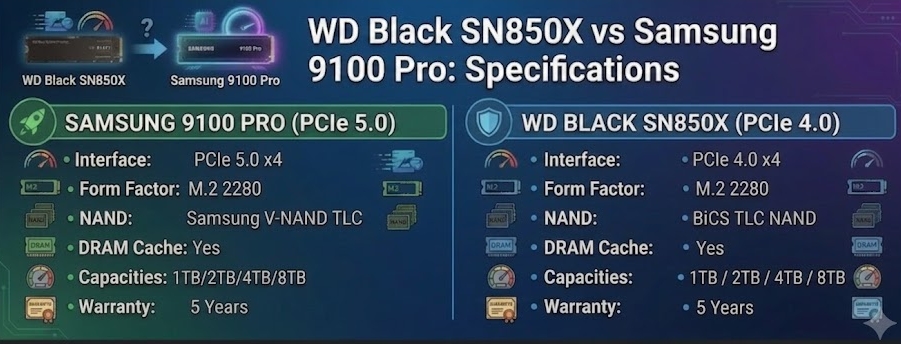
Interface: PCIe 5.0 vs PCIe 4.0
The biggest difference between the Samsung 9100 Pro and WD Black SN850X is the interface.
The Samsung 9100 Pro uses a PCIe 5.0 x4 connection, doubling the theoretical bandwidth available over PCIe 4.0 x4. As a result, sequential read speeds can reach up to 14.8 GB/s, while the WD Black SN850X tops out at around 7.3 GB/s.
On paper, that’s a huge gap between PCIe 5.0 and PCIe 4.0. In practice, whether you’ll actually notice it depends on how you use your PC.
Does PCIe 5.0 Actually Matter?
For some workloads, yes.
If you regularly edit 4K or 8K video, copy hundreds of gigabytes of data, work with large codebases, or run multiple virtual machines, PCIe 5.0 can noticeably reduce transfer times and improve workflow efficiency.
Gaming and everyday computing are a different story. Modern games rarely come close to using all the bandwidth available on a PCIe 4.0 SSD. Windows boots in seconds, applications launch almost instantly, and day-to-day responsiveness feels very similar on both drives.
That’s why many enthusiasts still recommend a high-end PCIe 4.0 SSD for gaming builds. Unless your workload can take advantage of Gen5 bandwidth, the biggest differences tend to show up in benchmark results rather than everyday use.
⚠️PCIe 5.0 is a worthwhile upgrade for storage-intensive workloads, but it offers only modest benefits for gaming and general desktop use.
Capacity Options
Both SSDs are available in capacities ranging from 1TB to 8TB, though availability may vary by region. For most buyers, choosing the right capacity will have a bigger impact on everyday usability than chasing the highest sequential speeds.
- 1TB is enough for Windows, productivity software, and a small game library.
- 2TB is the sweet spot for most gaming PCs and creator systems.
- 4TB is ideal for larger game libraries, RAW photos, and video projects.
- 8TB is best suited to professionals working with massive datasets, virtual machines, or high-resolution video.
If you’re deciding between a smaller Gen5 drive and a larger Gen4 model at a similar price, the extra capacity is often the more practical upgrade.
Controller
The controller is the brain of an SSD. It manages data transfers, wear leveling, error correction, cache, and communication with the operating system.
Samsung equips the 9100 Pro with its latest in-house PCIe 5.0 controller, designed to handle much higher bandwidth than previous generations.
The WD Black SN850X uses Western Digital’s proven in-house PCIe 4.0 controller, which remains one of the fastest and most reliable designs in its class.
Under sustained workloads, Samsung’s newer controller has the advantage. For gaming and everyday desktop use, however, the difference is rarely noticeable.
NAND Flash
Both drives use high-quality TLC NAND rather than lower-cost QLC flash, although each relies on its own NAND technology.
Compared with QLC-based SSDs, TLC NAND generally provides:
- Better sustained write performance
- Higher endurance
- More consistent performance during heavy workloads
In other words, neither drive cuts corners on flash memory. Both are built for enthusiast-level performance.
DRAM Cache
Another similarity is that both SSDs include dedicated DRAM cache. While it’s easy to overlook on a spec sheet, DRAM plays an important role in maintaining consistent performance, especially during demanding workloads.
Compared with DRAM-less SSDs, drives with onboard DRAM typically:
- Stay more responsive during multitasking
- Maintain higher write speeds during long file transfers
- Deliver more consistent random read and write performance
If you’re buying a premium NVMe SSD, dedicated DRAM is still a feature worth having.
Endurance and Warranty
Both drives are backed by a five-year warranty and offer comparable endurance ratings, with higher-capacity models providing higher TBW (terabytes written) limits.
For the vast majority of users, endurance won’t be a deciding factor. Even frequent game installs, video editing, and large file transfers are unlikely to approach the rated write limits over the drive’s normal lifespan.
Unless your workload involves writing several terabytes of data every day, both SSDs should provide years of reliable service.
WD Black SN850X vs Samsung 9100 Pro: Performance
Benchmark numbers only tell part of the story. The real question is whether those higher speeds actually improve your day-to-day experience.
Sequential Performance
Sequential performance is where the Samsung 9100 Pro pulls ahead. Its PCIe 5.0 interface allows much higher read and write speeds, making it the better choice for moving large files. If you’re regularly transferring hundreds of gigabytes between fast PCIe 5.0 drives, those jobs can finish noticeably sooner.
- For video editors, 3D artists, and anyone working with large media libraries, the time savings can be worthwhile.
- For everyone else, large sequential transfers simply aren’t part of everyday computing, so the difference is less noticeable.
Random Performance
Random performance and low latency have a bigger impact on how responsive a PC feels than peak sequential speeds. Tasks like launching applications, booting Windows, opening browser tabs, and loading thousands of small files rely heavily on random reads and writes.
In these situations, the Samsung 9100 Pro and WD Black SN850X perform much more similarly than their headline specifications suggest. Both feel fast, responsive, and difficult to distinguish in normal desktop use.
Windows Boot Time
One of the most common questions about PCIe 5.0 SSDs is whether they noticeably reduce Windows boot times.
For most systems, the answer is no. Boot time depends on much more than storage speed. Firmware initialization, hardware checks, driver loading, and background services all play a role before Windows reaches the desktop.
As a result, both SSDs boot Windows in just a few seconds, with little practical difference between them.
Large File Transfers
Large file transfers are where the Samsung 9100 Pro delivers its biggest real-world advantage. If your workflow involves moving virtual machine images, project assets, or high-resolution video footage, PCIe 5.0’s higher bandwidth can noticeably shorten transfer times.
For users who mostly work with smaller files, however, the performance gap becomes much less significant.
Here is a Reddit post about Samsung 9100 vs WD SN850X:
Gaming Performance
Many buyers assume that the fastest SSD will also deliver the fastest gaming experience, but that’s not always the case.
Compared with a hard drive or an older SATA SSD, either of these NVMe drives is a major upgrade. The jump from a high-end PCIe 4.0 SSD like the WD Black SN850X to a PCIe 5.0 model is much smaller.
Some games may load a little faster on the Samsung 9100 Pro, but the difference is usually small and varies from one title to another. Once you’re in the game, frame rates are determined by your CPU and graphics card—not your SSD.
9100 Pro vs SN850X: Thermals & Power Efficiency
When comparing flagship PCIe 5.0 and PCIe 4.0 SSDs, raw speed is usually the first thing people notice. Thermal performance and power efficiency, however, often have a bigger impact on long-term usability.
A drive that reaches 14GB/s in a short benchmark looks impressive, but real-world workloads like gaming, video editing, large file transfers, and daily system usage depend heavily on sustained performance and heat management.
Samsung 9100 Pro Thermal Performance
The Samsung 9100 Pro takes full advantage of the PCIe 5.0 interface, offering nearly twice the sequential bandwidth of high-end PCIe 4.0 SSDs. That extra performance comes with higher power demands during sustained workloads, although Samsung has improved efficiency compared with many first-generation PCIe 5.0 drives.
Tasks can keep the drive under heavy load for long periods, generating more heat than a typical PCIe 4.0 SSD such as:
- Editing 4K or 8K video
- Copying hundreds of gigabytes of data
- Working with large creative projects
- Running virtual machines
- Extended benchmark or stress testing
With an M.2 motherboard heatsink—or Samsung’s optional heatsink—the 9100 Pro can maintain high performance without significant thermal throttling in most desktop systems.
If you’re building a PCIe 5.0 system, using a heatsink is strongly recommended to achieve optimal performance under sustained workloads.
WD Black SN850X Thermal Performance
The WD Black SN850X operates on the PCIe 4.0 interface and generally draws less power than the Samsung 9100 Pro. That translates into several practical advantages:
- Lower operating temperatures
- Less demanding cooling requirements
- Easier integration into compact desktops
- Consistent performance during long gaming sessions
Although a heatsink is still recommended for heavy workloads, the SN850X is generally easier to keep cool than most PCIe 5.0 SSDs. For gaming, web browsing, office work, and everyday desktop use, thermal differences between the two drives are unlikely to affect the overall experience.
Power Efficiency Comparison
| Category | Samsung 9100 Pro | WD Black SN850X |
|---|---|---|
| Peak Performance | Higher | Lower |
| Typical Power Draw | Higher | Lower |
| Heat Output | Higher under sustained load | Lower |
| Heatsink Recommendation | Strongly recommended | Recommended for sustained workloads |
| Compact System Suitability | Good with adequate cooling | Better |
- The Samsung 9100 Pro delivers substantially higher peak performance but also requires more power at full speed.
- The WD Black SN850X offers a better balance of performance, power consumption, and thermal behavior, making it an excellent choice for gaming PCs and general-purpose desktops.
9100 Pro vs SN850X: Price and Value Comparison
Price is one of the biggest differences between the Samsung 9100 Pro and WD Black SN850X. While both are premium NVMe SSDs, they target different types of users.
As a newer PCIe 5.0 flagship drive, the Samsung 9100 Pro sits at the higher end of the market and typically costs more than the SN850X.
The WD Black SN850X has been available for longer and frequently receives discounts, making it one of the best-value high-end PCIe 4.0 SSDs on the market today.
| SSD | Positioning | Price Level | Best For |
|---|---|---|---|
| Samsung 9100 Pro | Flagship PCIe 5.0 SSD | Higher | Enthusiasts, creators, and heavy workloads |
| WD Black SN850X | High-end PCIe 4.0 SSD | Lower | Gamers, mainstream PC users |
Is Samsung 9100 Pro Worth the Extra Cost?
For users upgrading from a SATA SSD or an older PCIe 3.0 drive, both SSDs deliver a major performance improvement.
However, the Samsung 9100 Pro’s price premium is harder to justify for users who already own a high-end PCIe 4.0 SSD like the WD Black SN850X.
The Samsung 9100 Pro makes the most sense if you:
- Need maximum sequential performance
- Frequently move very large files
- Work with high-resolution video or other storage-heavy workloads
- Already have a PCIe 5.0 platform
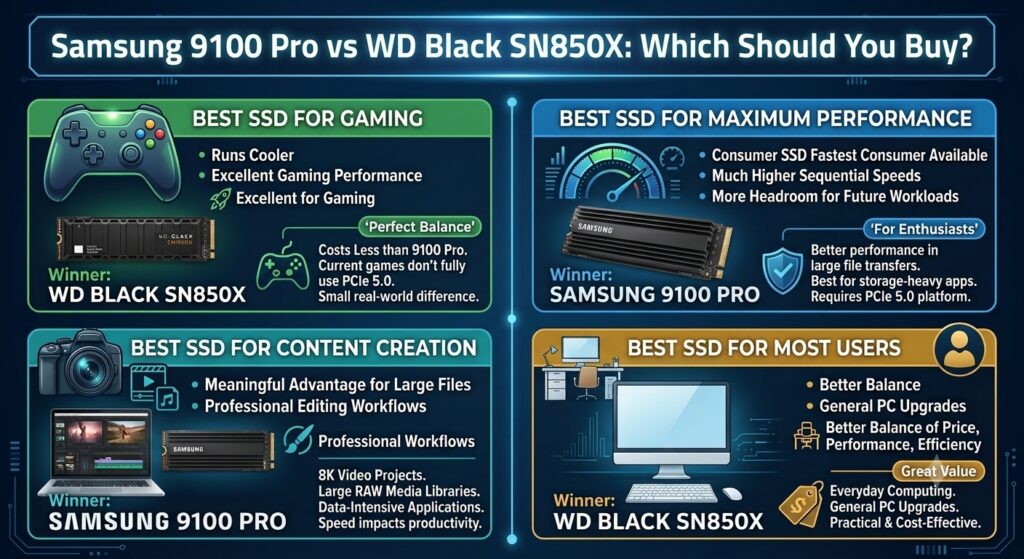
For gaming and everyday computing, the SN850X usually offers better value because the real-world performance gap is much smaller than benchmark results suggest.
Which SSD Has Better Value?
For most users, especially gamers, the WD Black SN850X offers the better balance of price and performance:
- Excellent gaming performance
- Lower power consumption
- Easier thermal management
- Proven PCIe 4.0 compatibility
The Samsung 9100 Pro is a faster SSD, but many users will not fully benefit from its additional PCIe 5.0 bandwidth.
| Category | Winner |
|---|---|
| Maximum performance | Samsung 9100 Pro |
| Best price-to-performance ratio | WD Black SN850X |
| Upgrade from SATA SSD | Either SSD |
| Upgrade from a premium PCIe 4.0 SSD | Samsung 9100 Pro is only for demanding workloads |
Samsung 9100 Pro vs WD Black SN850X: Which Should You Buy?
There is no single winner between the Samsung 9100 Pro and WD Black SN850X. The better choice depends on your workload, budget, and hardware platform.
Should You Upgrade from SN850X to Samsung 9100 Pro?
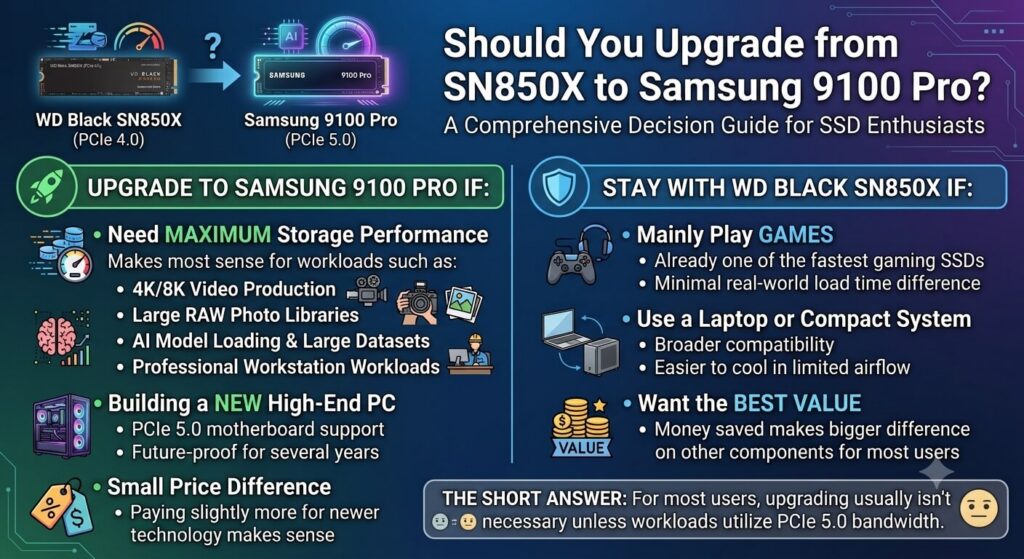
This is one of the most common questions among SSD enthusiasts. The short answer:
If you already own a WD Black SN850X, upgrading to the Samsung 9100 Pro usually isn’t necessary unless your workload can take advantage of PCIe 5.0 bandwidth.
Final Verdict: Samsung 9100 Pro vs WD Black SN850X
The Samsung 9100 Pro wins the performance battle. It is faster and newer, representing the future direction of high-end SSD technology.
However, the WD Black SN850X remains the smarter choice for many users. For gamers, everyday users, and most PC builders, the SN850X already delivers near-flagship performance without the added cost and thermal overhead.
The Samsung 9100 Pro is best viewed as a premium enthusiast SSD for users who can actually use its additional bandwidth.
Final recommendation:
- 🏆 Best overall value: WD Black SN850X
- 🚀 Fastest performance: Samsung 9100 Pro
- 🎮 Best gaming SSD: WD Black SN850X
- 🎬 Best professional workstation SSD: Samsung 9100 Pro
For most people building a PC today, the SN850X is still the SSD to buy. The 9100 Pro is the choice for users who want the fastest possible storage and are willing to pay for it.