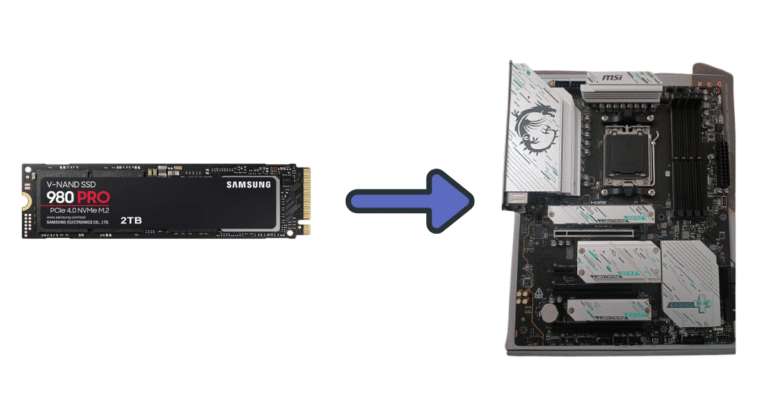
Because NVMe SSDs utilize the PCIe interface for data transmission, their connection depends on whether the PCIe allows them to do so or not. Because the PCIe interface is forward and backward-compatible with different PCIe generations, a Gen 3.0 NVMe will work in a Gen 4.0 NVMe slot. You can learn more about the difference between NVMe and PCIe here. But this applies to any version of PCIe. They work in any other variant, whether higher or lower.
The NVMe protocol utilizes the PCIe interface and is both forward- and backward-compatible. So, there would be no issues using any NVMe SSD on any generation NVMe slot.
To work on a computer, the NVMe SSDs require a slot (typically M.2 or U.2). These slots must have at least 4 PCIe lanes allocated to them to offer the maximum bandwidth to the drive.
Then, the slot must support the NVMe protocol, which the operating system should also support. If your system offers all these features to a drive, it will work without any issues.

Meaning of “Generation” in NVMe SSDs
The full name of an NVMe SSD is M.2 PCIe NVMe SSD. M.2 is the form factor describing the physical aspects of that drive. PCIe is the interface through which the data is sent and received from and to the SSD. NVMe is the protocol used by the SSD controller and the OS to streamline data transmission and enhance performance using the power of parallelism.
The PCIe interface uses the concept of generation. As PC components become faster, the channel through which data is transmitted from the CPU to other expansion cards must also increase in speed. Therefore, the PCIe continues to improve its speeds with each new generation. The PCIe 5.0 generation is currently the most popular, but the 6.0 generation has also been launched.
So, the word generation indicated the amount of bandwidth and throughput allowed to our devices. With the higher generation, more of these are offered. The latency is reduced, and transmission gets much faster.
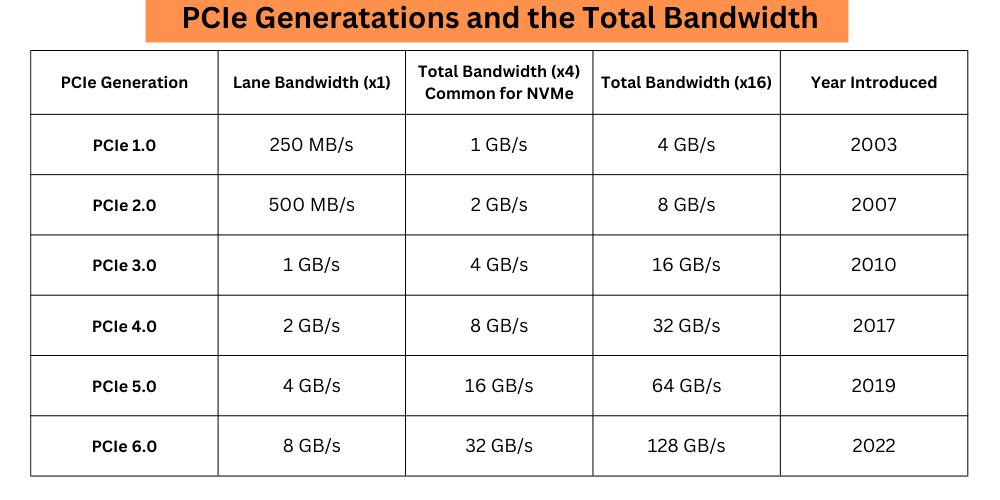
In SSDs, generation refers to the SSD’s compatibility with higher PCIe motherboards, CPUs, and M.2 PCIe ports. If your SSD supports PCIe Generation 5.0, it means it will offer its best speed with a system and port that have 5.0 compatibility. But, it doesn’t mean it is reserved only for the Gen 5.0 devices. You can use a PCIe 1.0 SSD (if available) and run it perfectly in a Gen 5.0 slot. This will also happen in vice-versa, but the total bandwidth that the Gen 5.0 SSD can use will be limited to the Gen 1.0 interface, which is 1GB/s at x4 lanes.
Meaning of x4, x8, and x16 lanes of PCIe in SSDs
Most NVMe SSDs require an M.2 NVMe port with at least four PCIe lanes to deliver their best performance. However, some SSDs with higher speeds may demand more lanes. In your SSD’s datasheet, box, or official page, you can check the required number of lanes.
For example, if your SSD requires 8 PCIe lanes and you install it into an NVMe port with only four lanes, the SSD will deliver only half of its maximum read/write speed.
One PCIe lane is a dual-way path for data transmission and reception. Both lanes can operate simultaneously. Therefore, if your drive requires 4 PCIe lanes, it will perform optimally using the same number of lanes. The same goes for graphics cards, Wi-Fi Cards, and other expansion cards that connect to the PCIe slots.
Generally, the top-most ports on the motherboard, which are located near the CPU, have the most lanes and hence the highest bandwidth. So, if your CPU and motherboard both support PCIe 4.0 generation, the topmost M.2 slot will give the best bandwidth to your drive.
How do NVMe SSDs interact with the system?
The NVMe SSDs connect to the motherboard with the help of a PCIe interface on the physical level. The real interaction is controlled more by the software side. The PCIe provides the physical lanes, as we discussed above. However, the data transmission is handled by the NVMe.
NVMe can be described as a protocol that determines how data transmission will occur between the SSD and the system. It is a software-level protocol that works inside the controller as a protocol and on the operating system as an NVMe driver.
It establishes rules for data transmission that are adhered to by the entire system. Because SSDs are capable of parallelism because of NAND Flash memory, NVMe makes the best use of it by allowing the system to utilize this high bandwidth. The queue depth increases to up to 65535 queues, and each queue can handle up to 65535 commands. For comparison, the AHCI interface (with SATA) just had one command queue and up to 32 commands per queue.
In simple words, the NVMe SSDs interact with your computer through the PCIe interface on the M.2 port, but the majority of the software things are handled by the NVMe protocol. NVMe is the software that enables SSDs to achieve high read/write speeds due to its advanced command queueing algorithms and overall efficiency.
Do PCIe generations matter?
Yes, PCIe generations matter when it comes to achieving the best possible performance from our components. These components may include graphics cards, RAID cards, Wi-Fi cards, SSDs, and more. If a PCIe 5.0 component is installed on a PCIe 4.0-supported system, its performance will get bottlenecked.
PCIe generations are also important to enhance PC performance over time. For the CPUs that support PCIe 5.0, the required bandwidth and the overall environment should be upgraded to its level. Without a proper connection with other components, the CPU won’t be able to give its best.
Are Gen 3.0 and Gen 4.0 NVMe ports the same?
Yes, a Gen 3.0 M.2 NVMe port and a Gen 4.0 NVMe share the same port structure. The working and the connections will also be the same. It is simply because the generation has been upgraded, and the allowed speed has increased with the upgraded port. Everything else, including port, physical compatibility, and software compatibility, remains unchanged.
Will I get full Gen 3.0 NVMe speed on the Gen 4.0 port?
You will have all the speed that your SSD can offer, as you are allowed to use double the bandwidth required. The PCIe 4.0 can operate at a data transfer speed of 2GB/s per lane. The PCIe 3.0, on the other hand, offers just 1 GB/s per lane. Your Gen 3.0 SSD can provide performance of up to 4GB/s, while Gen 4.0 ports are designed to handle speeds of up to 8GB/s. Therefore, you will be able to utilize all the speed that your SSD can offer on a Gen 4.0 port; however, that port is designed to handle much higher and better performance.
In computer hardware terms, this is referred to as overkill because you are using slower components on a port that is designed for a much faster one.
I hope this helps!