Affiliate Disclosure: This post may include affiliate links. If you click and make a purchase, I may earn a small commission at no extra cost to you.
If you ever search for the best Gen 5.0 NVMe SSD, you will surely see the Crucial T705 and T700 as the possible contenders. Both of these drives are high-end NVMe drives and compete well in the industry. But if you are confused between the two, I am here to clear it out for you.
I have already compared the Crucial T705 with Samsung’s top Gen 5.0 drive, i.e., 9100 Pro. But today, we’ll compare the T700 Gen 5.0 NVMe to the newer one, the T705.
Both drives use the same Phison E26 controller and B58R FortisFlash NAND from Micron. But the performance difference is pretty huge. The Crucial T700 can reach 12 GB/s in sequential reads and 11 GB/s in sequential writes. The random read and write IOPS can reach 1500 K. On the other hand, the T705 can offer the maximum sequential read speed of 14,100 MB/s and write speed of 12,600 MB/s. The maximum random read IOPS are 1500K, but the random write IOPS are higher at 1800K.
The T705 is the better one in terms of performance and is suitable for heavy workloads. However, the T700 can save you some money if the best Gen 5.0 performance isn’t your priority. The T700 will also run cooler than the T705.
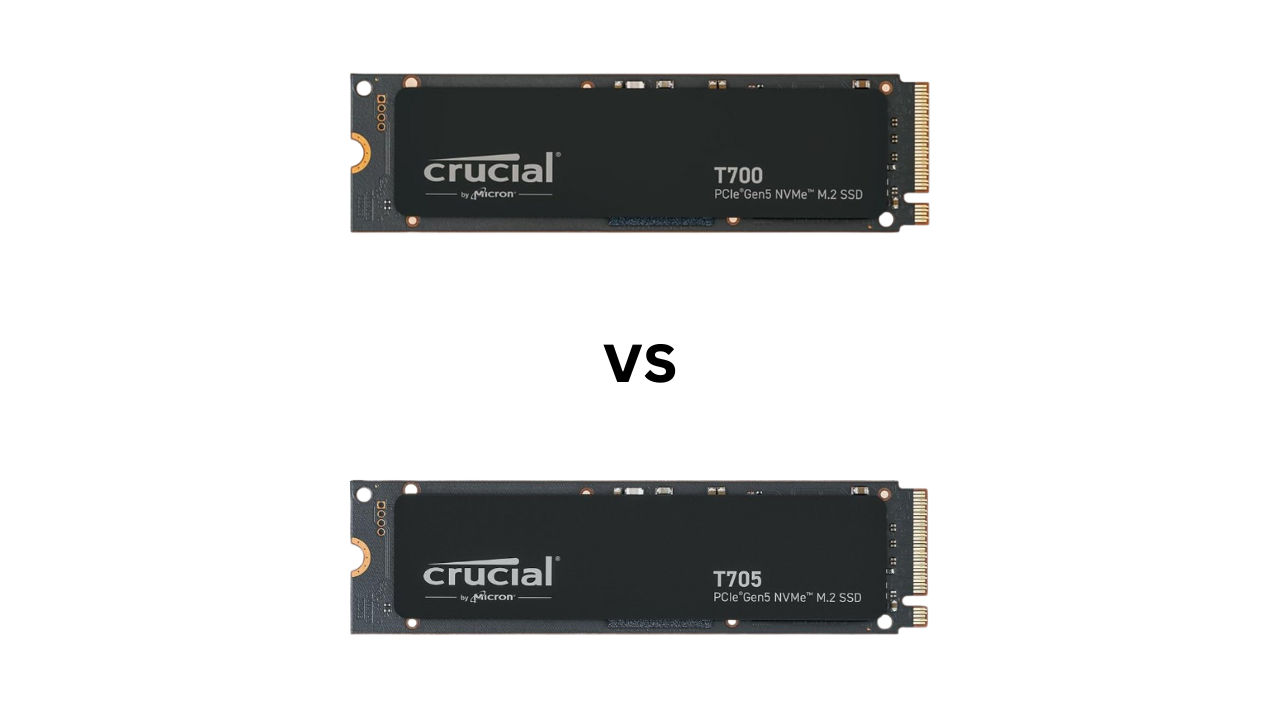
There are reasons to pick both drives in different situations, and we will discuss everything in detail in this article. So, let’s get started.
Theoretical Specifications
| Specification | Crucial T700 | Crucial T705 |
|---|---|---|
| PCIe Generation/NVMe Version | PCIe Gen 5.0 x4/ NVMe 2.0 | PCIe Gen 5.0 x4/ NVMe 2.0 |
| Release Date | 2023 | Feb 20th, 2024 |
| Capacities | 1TB, 2TB, 4TB | 1TB, 2TB, 4TB |
| Sequential Read Speed | 1TB: 11,500 MB/s 2TB: 12,000 MB/s 4TB: 12,000 MB/s | 1TB: 13,600 MB/s 2TB: 14,500 MB/s 4TB: 14,100 MB/s |
| Sequential Write Speed | 1TB: 9,500 MB/s 2TB: 11,000 MB/s 4TB: 11,000 MB/s | 1TB: 10,200 MB/s 2TB: 12,700 MB/s 4TB: 12,600 MB/s |
| Random Read Speed | 1TB: 1,200 IOPS 2TB: 1,500K IOPS 4TB: 1,500K IOPS | 1TB: 1,400K IOPS 2TB: 1,550K IOPS 4TB: 1,500K IOPS |
| Random Write Speed | 1TB: 1,500 IOPS 2TB: 1,200K IOPS 4TB: 1,500K IOPS | 1TB: 1,750K IOPS 2TB: 1,550K IOPS 4TB: 1,500K IOPS |
| NAND Flash | Micron’s B58R FortisFlash TLC | Micron’s B58R FortisFlash TLC |
| DRAM | Yes | Yes |
| Controller | Phison E26 | Phison E26 |
| Pricing | Starting from $111.90 for 1TB | Starting at $129.99 (1TB) |
The Crucial T705 is essentially a refined, overclocked successor to the already blistering T700, both built on PCIe Gen 5.0 and powered by the same Phison E26 controller and Micron B58R FortisFlash TLC NAND. The T705 pushes the limits further. Its sequential reads jump from 12,000 MB/s to 14,500 MB/s, and writes climb from 11,000 MB/s to 12,700 MB/s on the 2TB model, giving it a roughly 20% uplift in raw throughput.
Random performance also improves slightly, with small gains across both reads and writes. These boosts likely come from firmware tuning and improved thermal headroom rather than hardware changes. In short, the T705 is the same beast as the T700, just faster, smoother, and better optimized for enthusiasts or professionals chasing the absolute bleeding edge of PCIe 5.0 speed.
Benchmark Scores
The benchmark scores are gathered from trusted third-party sources. They are mainly from Tom’s Hardware, and links to them are provided at the end of the article. The results are for the 2TB (non-heatsink) variants of both drives.
PCMark 10 (Full Drive Benchmark)
PCMark 10 Full Drive Benchmark runs a series of real-world tests to evaluate SSDs as the primary OS drive. There is a quick benchmark as well, with simple tests that aim to check SSDs’ capabilities as secondary drives. We are comparing the Full Drive benchmark. The results that we get are the PCMark 10 score, bandwidth, and latency. You can learn more about the PCMark 10 benchmark here.
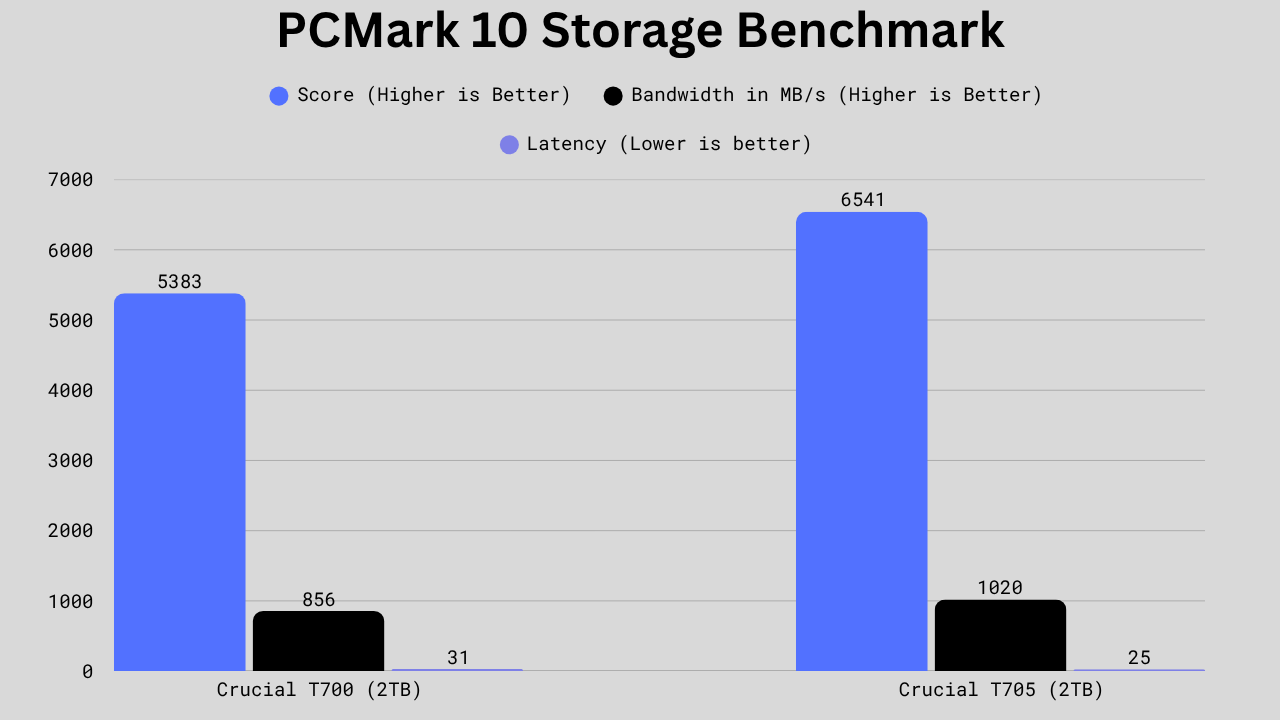
In PCMark 10 Full Drive Benchmark, the Crucial T705 shows a clear generational leap over the T700. Its overall score jumps from 5,383 to 6,541, an about 21% improvement, indicating much better full-system responsiveness. The bandwidth climbs from 856 MB/s to 1,020 MB/s, a 19% boost, while latency drops from 31 µs to 25 µs, meaning it’s quicker and more efficient under load. The T700 is still a powerhouse, but the T705 refines it into a smoother, faster performer for power users and creators who demand peak responsiveness.
3DMark Storage Test
3DMark Storage Test is a full-fledged program for testing a drive’s gaming and gaming-related capabilities. It takes the drives through multiple tests, including game loading, saving, installing, recording, and streaming, etc. A higher 3DMark benchmark score means a better gaming performance from the drive. Bandwidth is the amount of data that can move in a given time. Higher bandwidth means better performance in file loading and handling multitasking. Latency means the time delay between a request for data and the start of data transfer. It is responsible for the drive’s responsiveness.
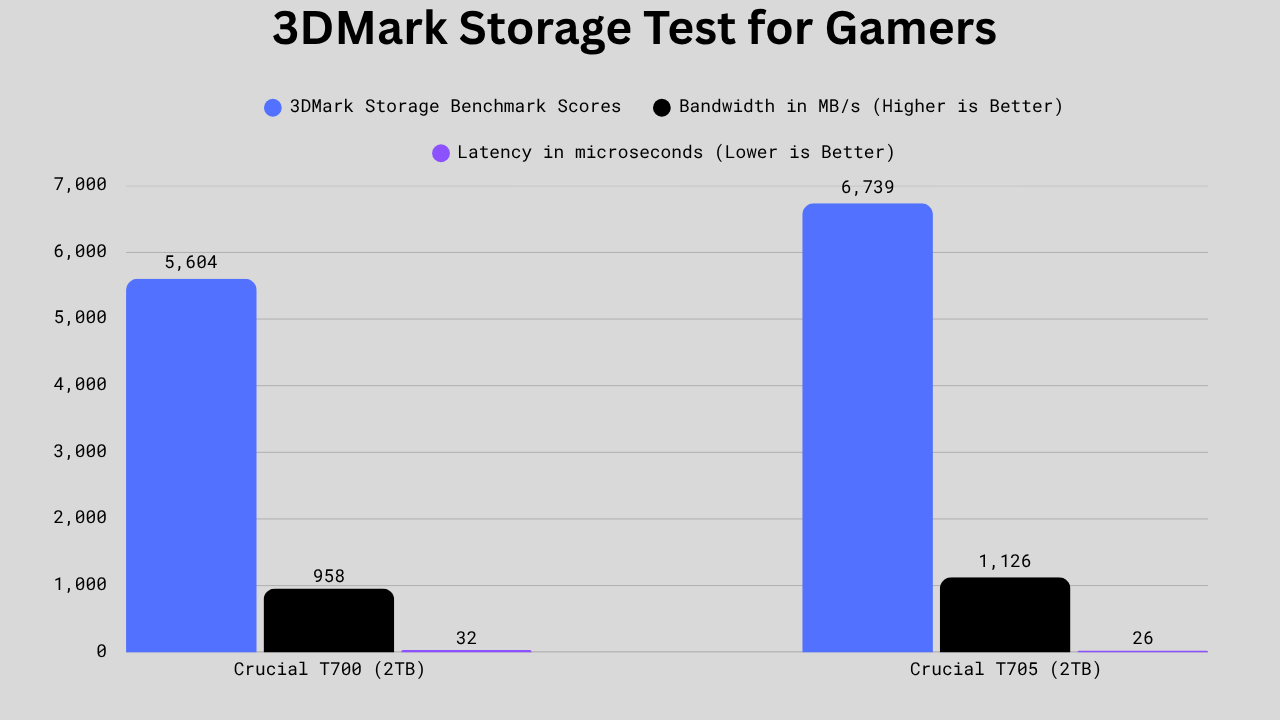
In the 3DMark Storage Benchmark, the Crucial T705 outpaces the T700 across the board. Its score jumps from 5,604 to 6,739, a 20% uplift, and bandwidth rises from 958 MB/s to 1,126 MB/s, showing it moves data faster and handles game-related storage tasks more efficiently. Overall, the T705 isn’t just a minor refresh; it delivers real-world gains in responsiveness and sustained throughput, making it the stronger choice for gaming and performance-heavy workflows.
CrystalDiskMark Peak Sequential Read/Write Speed
For the peak sequential read/write tests, we have chosen the 1MB block size with the queue depths of 1 and 8. Below are the results.
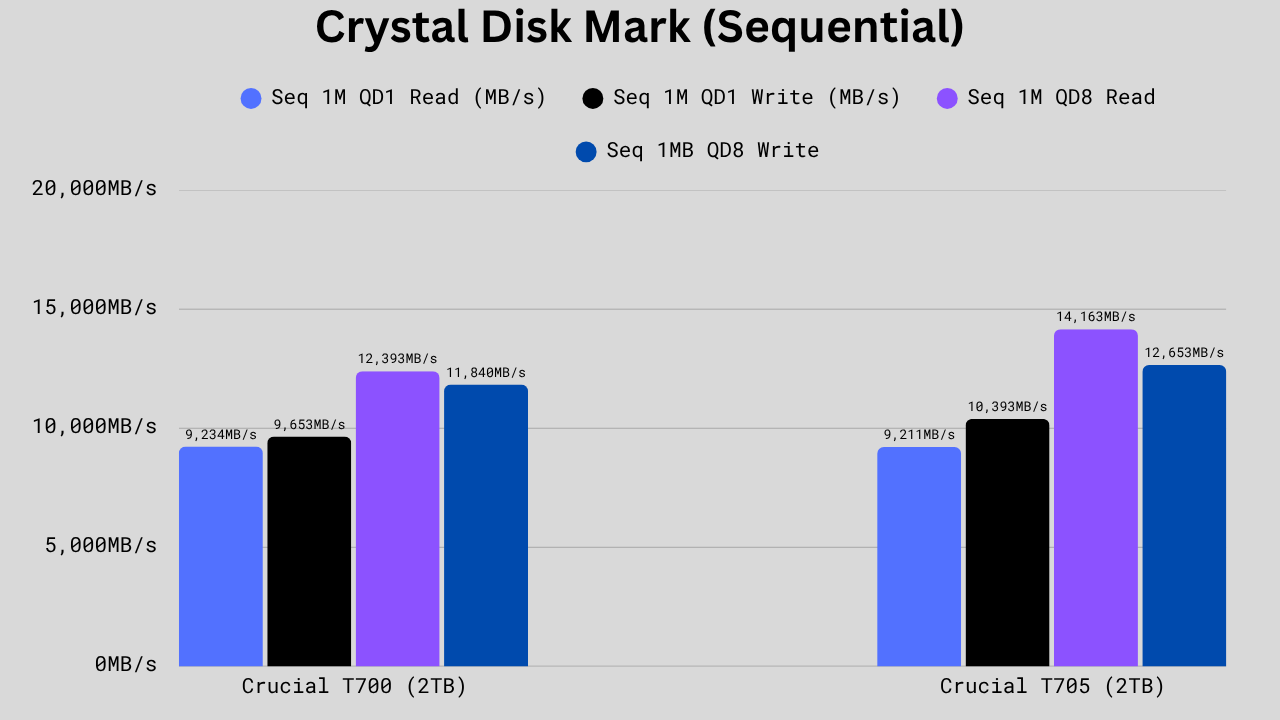
In sequential performance, the Crucial T705 again leads the results. At QD1, reads are essentially identical: 9,211 MB/s vs 9,234 MB/s. However, the writes jump from 9,653 MB/s to 10,393 MB/s, about an 8% gain. The bigger improvement shows up at QD8, where reads climb from 12,393 MB/s to 14,163 MB/s (14% faster) and writes rise from 11,840 MB/s to 12,653 MB/s (7% gain). These boosts mean the T705 handles large file transfers and sustained workloads with less slowdown and more consistent throughput. The T700 is still lightning fast, but the T705 clearly pushes PCIe 5.0 closer to its limits.
CrystalDiskMark Peak Random IOPS
For the peak random IOPS benchmark, we have selected 4KB block size at the queue depths of 1 and 256. Below are the results.
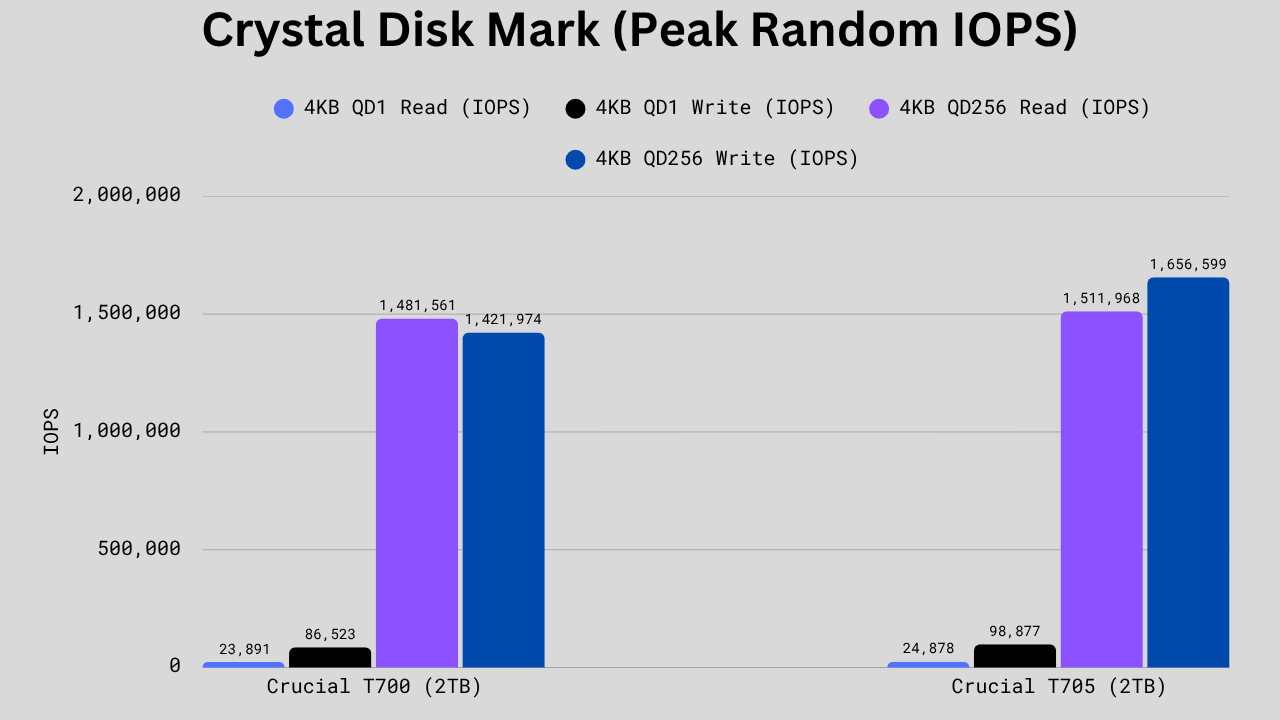
In 4KB random performance, the Crucial T705 again edges past the T700 with small but meaningful gains. At QD1, reads rise from 23,891 to 24,878 IOPS (about 4% faster) and writes jump from 86,523 to 98,877 IOPS, a solid 14% improvement. The real jump comes at QD256, where reads tick up slightly to 1,511,968 IOPS vs 1,481,561, and writes surge from 1,421,974 to 1,656,599, roughly a 16% boost. Those write-side improvements make the T705 more responsive under heavy multitasking and data-intensive workloads.
File Read and Write Speed Comparison
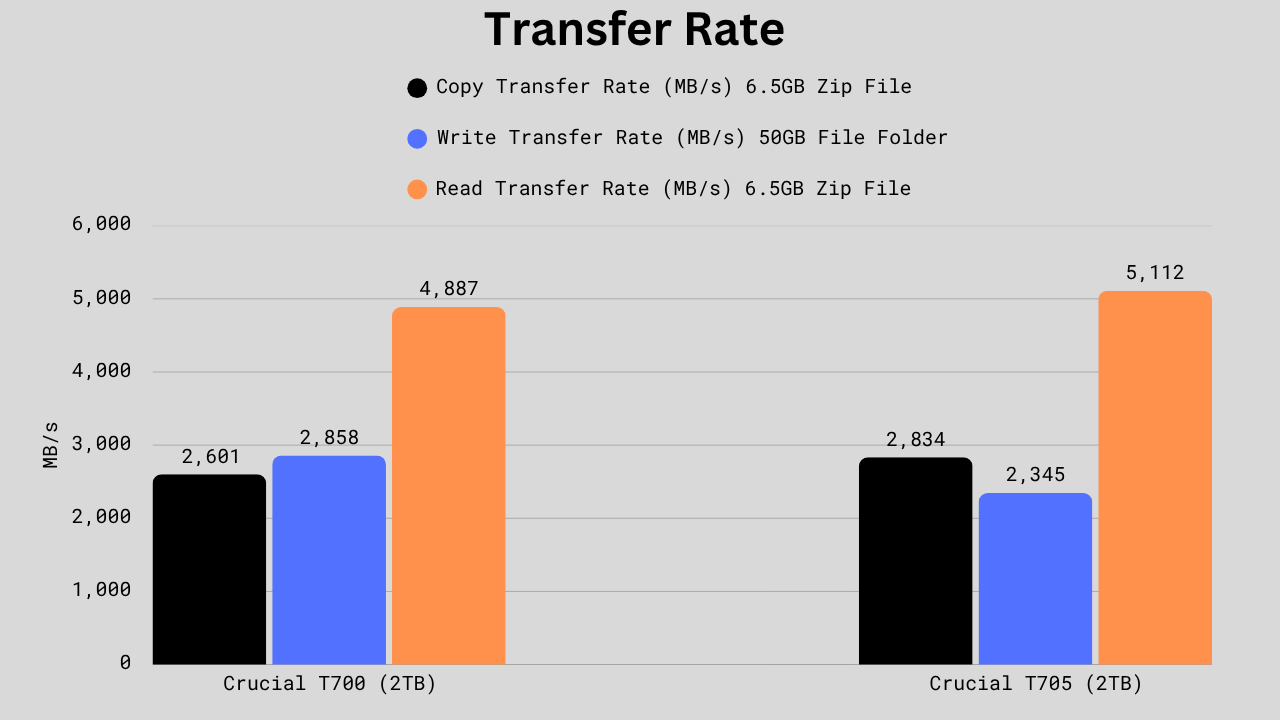
In large file transfer tests, the Crucial T705 shows mixed results compared to the T700. It copies files faster overall at 2,834 MB/s vs 2,601 MB/s, about a 9% boost. The T705 also reads large compressed files quicker, hitting 5,112 MB/s vs 4,887 MB/s (+5%). However, its sustained write transfer rate drops from 2,858 MB/s to 2,345 MB/s, roughly an 18% decrease, likely due to firmware-level adjustments that favor read efficiency and cache stability. In short, the T705 moves data faster in most real-world reads and copies, but it’s not as strong in heavy continuous write workloads.
Power Consumption and Efficiency
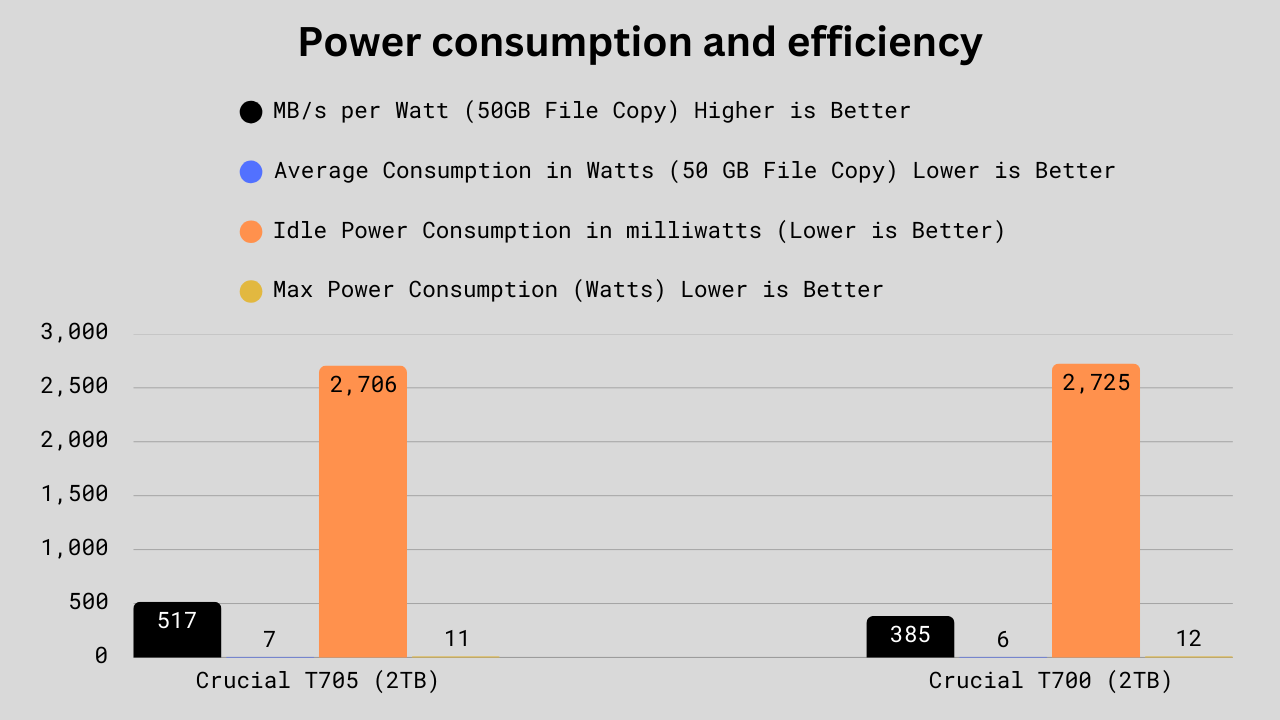
The Crucial T705 again beats the T700 in the overall efficiency or MB/s. It offers around 517 MB/s per watt compared to the T700’s 385. MB/s per watt is an important parameter deciding how much work an SSD can do using a single watt. It is an indirect parameter for deciding the heat generation as well.
The average power consumption of the T705 is higher than that of the T700 due to its higher raw throughput. The Idle power consumption is almost the same: 2706 for T705 and 2725 for T700. The maximum power consumption, however, is little higher from the T700 at 12 Watts compared to the T705’s 11 watts. Overall, we can say that the T705 is much power efficient and get work done using less power.
Write speed after SLC exhaustion
The 2TB variant of the Crucial T700 comes with approximately. 320GB of dynamic SLC write cache, while the T705 has approximately 220 GB of it. The theoretical raw write speed after SLC exhaustion is around 3600 MB/s in T700 and 4000 MB/s in T705. In benchmarks like this one, the 2TB T705 drops to around 4000 MB/s after SLC exhaustion after about 20 seconds of burst write load. Then, after around 400 seconds, it drops below 2000 MB/s and then recovers to 4000MB/s at around 650 seconds.
The T700 drops below 4000 MB/s at around 3800 MB/s after almost the same time frame. However, it sustained at this speed for around 470 seconds and then recovered at around the same time, i.e., 650 seconds. So, we can say that the SLC performs as it is advertised.
Talking about the speed after exhaustion, the same tests showed that the T705 gave around 4029 MB/s steady state write performance after 15 minutes of write load on 1 MiB blocks at QD32. The T700 averaged at around 3605.
Overall, the write speed after exhaustion isn’t that much different, but the T705 definitely has an edge when it comes to the sustained write speed. But, because of its biggest SLC cache, the T700 can handle the burst data write loads more effectively.
Thermals
The heatsink version of T705 has a generally average of between 60 to 70°C in most of the benchmarks. The T700 rarely reached 60 degrees and generally stayed cooler than the T705. However, during Tom’s Hardware testing, the controller in the T700 reached around 87 degrees and then throttled under the rigorous and continuous write load.
We can say that the T705 runs cooler, and it is obvious by looking at the power consumption numbers above. The T705 has offered a better MB/s per watt while having lower maximum and average power consumption numbers.
Tech Specs
| Specification | Crucial T705 | Crucial T700 |
|---|---|---|
| Controller | Phison’s PS5026-E26 | Phison’s PS5026-E26 |
| Controller Architecture | ARM 32-bit Cortex-R5 + AndesCore 32-bit N25F RISC-V (5-Core) | ARM 32-bit Cortex-R5 + AndesCore 32-bit N25F RISC-V(5-Core) |
| DRAM Specifications | Micron’s LPDDR4 DRAM 1TB: 1×1024 MB 2TB: 1×2048 MB 4TB: 1x 4096 MB | Micron’s LPDDR4 DRAM 1TB: 1× 2048 MB 2TB: 1×2048 MB 4TB: 2x 4096 MB |
| SLC Write Cache | 1TB: approx. 110 GB (dynamic only) 2TB: approx. 220 GB (dynamic only) 4TB: approx. 440 GB (dynamic only) | 1TB: – 2TB: approx. 320 GB (dynamic only) 3TB: – |
| NAND Flash | Micron’s B58R FortisFlash TLC | Micron’s B58R FortisFlash TLC |
| Topology | 232-Layers | 232-Layers |
| NAND speed | 2400 MT/s | 2400 MT/s |
| Read Time (tR)/Program Time (tProg) | 61 µs/600 µs | 61 µs/600 µs |
| Die Read Speed | 1574 MB/s | 1574 MB/s |
| Die Write Speed | 160 MB/s | 160 MB/s |
| Encryption | AES-256, TCG Opal | AES-256, TCG Opal |
| Power Loss Protection | No | No |
| SMART/TRIM/PS5 Support | Yes/Yes/Yes | Yes/Yes/Yes |
Most of the technical specifications in both drives are almost similar because the same controller and NAND flash are used. The difference is mainly in the SLC write cache and DRAM buffer. Surprisingly, the T700 has better things to offer here. However, the T705 still performs better. This is why we should never underestimate the power of software refinement and firmware optimization in storage.
TBW, DWPD, MTBF, and Warranty
| Specificiation | Crucial T705 | Crucial T700 |
|---|---|---|
| TBW (Terabytes Written) | 1TB: 600 TBW 2TB: 1200 TBW 4TB: 2400 TBW | 1TB: 600 TBW 2TB: 1200 TBW 4TB: 2400 TBW |
| DWPD (Drive Writes per Day) | 0.3 | 0.3 |
| MTBF (Mean Time Between Failure) | 1.5 Million Hours | – |
| Warranty | 5 Years Limited | 5 Years Limited |
Everything here, including warranty, MTBF, and TBW, is the same again. Crucial T700’s datasheet says nothing about its MTBF, but the T705’s MTBF is confirmed to be 1.5 million hours.
Price Difference
The T700 is generally cheaper in both online and offline markets, so it’ll surely save you some money. However, during sales or on special occasions, you may find the T705 cheaper or at the same price as the T700. I would suggest checking and comparing the real-time prices before you make your purchase.


Which one should you choose: Crucial T705 or T700?
In terms of synthetic and real-world benchmarks, the T705 is undoubtedly going to benefit you in both professional and day-to-day tasks. But is that little margin really worth it for the extra money that you pay? That you’ll have to decide. I would consider the T700 if I were saving 20 or 30 bucks.
However, the price difference is generally isn’t that huge. So, if I am getting the 1TB T705 for 10 bucks more than the T700, it is worth spending that money, but not more than that.
Also, the real-world performance difference isn’t going to be that big with either drive. For most users, the extra performance the T705 offers is just overkill. However, if you are an ultimate performance enthusiast, gamer, or someone in need of the best of the best, you should go for the T705 instead of the T700.