

The best thing about the NVMe SSDs is that they use the PCIe interface to interact with our computers. And because the PCIe interface is forward and backward-compatible, these drives can be used on ports of different PCIe generations.
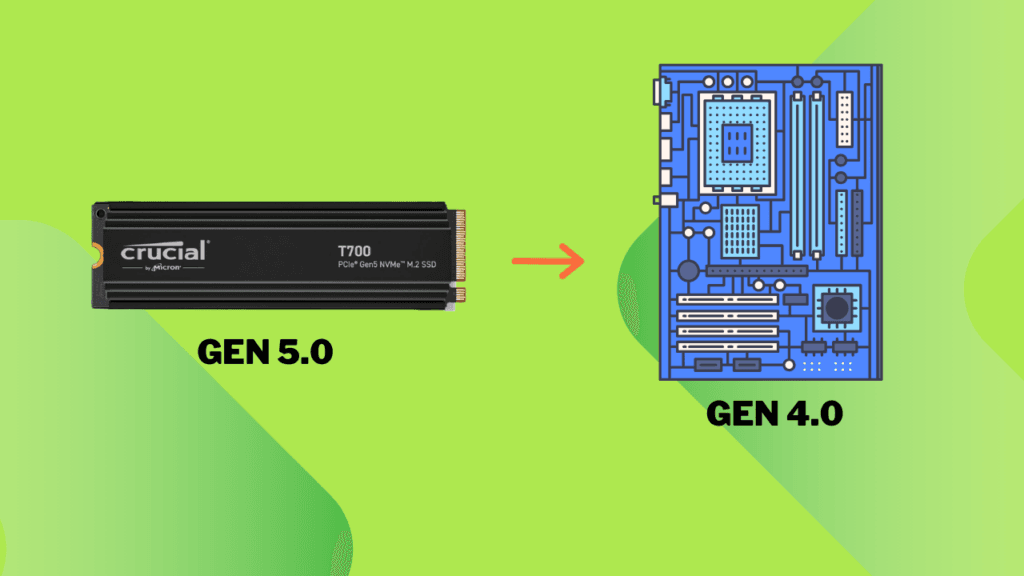
Yes, A PCIe Gen 5.0 NVMe SSD will work in a Gen 4.0 NVMe slot without any issue. The Gen 4.0 motherboard will detect it, and the CPU will send and receive data to and from this drive. However, the total bandwidth offered to this SSD will be half of what you will get on a Gen 5.0 system. Therefore, the drive will operate at half its normal speed.
The total allowed bandwidth per lane in a PCIe Gen 4.0 port is 2GB/s. So, the total for an M.2 x4 slot becomes 8GB/s. However, the Gen 5.0 drives can achieve speeds of up to 16GB/s. Most Gen 5.0 SSDs can’t reach 16GB/s, but their sequential read/write speeds can easily approach 10 to 14GB/s. In such cases, the system will present a severe bottleneck of 8GB/s to your Gen 5.0 SSD.
Understanding SSD and NVMe Generations
PCIe interface provides the required lanes to your NVMe drive through the M.2 port. Generally, your SSD will use 4 PCIe lanes for its operations. The CPU will interact directly with your SSD, but there is a twist to it. There is an NVMe protocol that sets the rules for data transmission. The NVMe will determine how the data is queued and how it is sent back to the CPU.
NVMe stands for Non-Volatile Memory Express, a specialized interface protocol used with PCIe drives. This is the reason they are called PCIe NVMe SSDs. With the help of NVMe, the command queue depth increases significantly, as discussed in this article.
Just like PCIe generations, NVMe also has its own generation. The current running generation is 2.0. The 2.1 has also been launched. The latest Gen 5.0 drives come with NVMe 2.0, which allows these drives to achieve data transfer rates of 4GB/s per lane. With 4 PCIe lanes, the SSDs now have a total bandwidth of 16 GB/s. With the new releases of both PCIe and NVMe, the latency is reduced, IOPS are improved, power efficiency increases, and algorithms advance.
We cannot discuss NVMe’s compatibility because it is merely a protocol defined at the software level. If an SSD is compatible with the system at the PCIe level, it will also be compatible at the NVMe level.
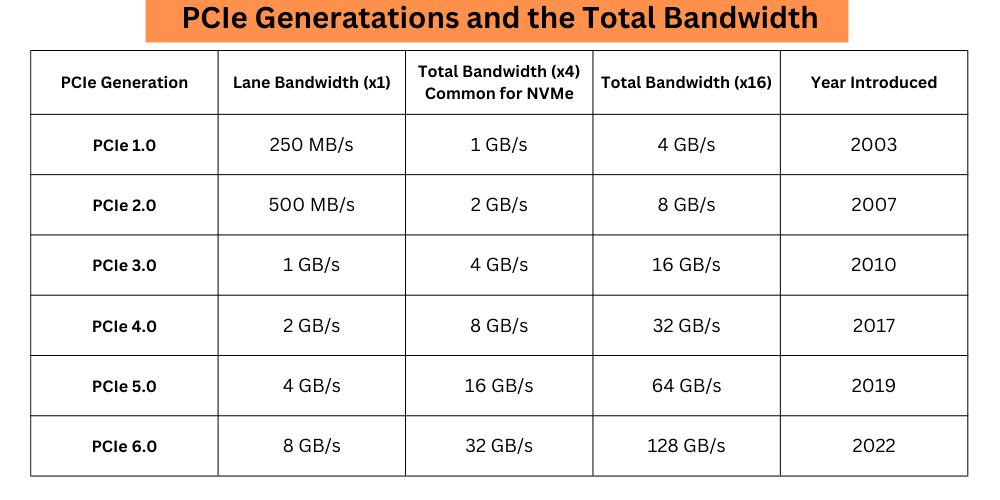
The point I am making here is that your PCIe 4.0 motherboard and CPU support 2GB/s GB/s per lane and 8GB/s in total with four lanes. This speed isn’t enough for your Gen 5.0 drive. If your Gen 5.0 SSD can offer you 10GB/s sequential read speed, it will be restricted to 8GB/s. This happens because the path isn’t enough for that extra speed.
Physical Compatibility
Because both Gen 4.0 and Gen 5.0 NVMe SSDs come in the M.2 form factor, there would be no issues related to the physical compatibility. A Gen 5.0 port will be physically identical to a Gen 4.0 port. The allowed speed, working conditions, and many other factors may differ, but the ports will always remain the same.
On both the Gen 4.0 and Gen 5.0 NVMe ports, you will find an SSD notch slot on the right side. Also, both types of drives will have a notch on their proper ends. So, there would be no issues in the connection on the physical level.
Software Compatibility
As we discussed earlier, the Gen 5.0 SSD is compatible with Gen 4.0 ports, and vice versa. But the transmission channels, i.e., PCIe lanes, are rated for a specific speed. You can imagine the Gen 5.0 lanes being wider than the Gen 4.0 lanes.
On the software level, the NVMe protocol would support both forward and backward versions of PCIe. It would adjust itself as per the SSD’s performance. The PCIe interface will also work perfectly, and all the drivers will detect your Gen 5.0 SSD.
In simple terms, you would use your Gen 5.0 NVMe on your Gen 4.0 system, even if you’re not aware of it. However, when you run a benchmark, you will never see performance exceeding 8GB/s in any way.
How much performance bottleneck will you get?
You can expect up to a 50% reduction in peak sequential read/write speeds due to the bandwidth limitation of the Gen 4.0 slot. However, actual performance loss in daily tasks may be less significant. This is because the random read/write performance will be affected way less than the sequential performance. For everyday tasks such as using software and running games, random performance matters the most. So, this limitation may not be noticeable in daily tasks, gaming, or even some professional workloads.
For systems with high read/write workloads, such as 4K/8K video editing or large-scale data processing, the bottleneck will be more significant.
In simple words, this performance bottleneck will be more serious in sequential read/write speeds.
Random Performance vs Sequential Performance
I would like to elaborate on this a little more. Sequential read/write performance in SSDs is primarily about transferring large files from one location to another. The best example of sequential data is a large video file. It can be stored in adjacent cells in SSDs in a continuous manner. Also, fewer mapping tables for data location will be created.
Random read/write performance, on the other hand, is about the movement of smaller data files. This type of data is generally used to run software. For example, to run Google Chrome, the CPU would need various types of files, including cookie files, history files, bookmark files, tab files, cache files, and others. These are generally of smaller size. These files take time to locate, store, interpret, and process by the storage drives.
We talked about the bandwidth above. We understood that the Gen 4.0 system will offer less bandwidth to a Gen 5.0 drive, hence reducing its sequential performance. This is right for big files. Sequential files depend more on the bandwidth i.e. MB/s or GB/s. Random data depends more on IOPS (Input Output Operations per second) and latency rather than the bandwidth alone.
Surely, the PCIe generation would also affect the random speed, but it is generally primarily dependent on the SSD controller, NAND flash, and firmware. Another issue is that the Generation 4.0 motherboard will have higher latency compared to the Generation 5.0. Still, I am sure you won’t notice any difference while using your software or playing games.
I hope this helps!


thanks a lot for the explanation. I wondered how mucha of an impact using a Gen 5 ssd in gen4 lanes would make to transfer a million small files from an ssd to another but you got me covered.