

Affiliate Disclosure: This post may include affiliate links. If you click and make a purchase, I may earn a small commission at no extra cost to you.
After the release of the Samsung 990 Pro, the 980 Pro is primarily out of sight. And there are reasons for it. With the latest NAND, enhanced controller, and other specifications, the 990 Pro is capable of achieving the top performance possible with the Gen 4.0 interface.
Both are Gen 4.0 NVMe drives, but they differ significantly in performance and specifications. Although the peak performance difference isn’t huge, the 990 Pro still has some significant advantages over the 980 Pro in real-world performance. In fact, the 990 Pro is more focused on enthusiasts. On the other hand, the 980 Pro fulfills the demands of most people with its multiple storage variants and average specifications.
While updating this article, I noticed that the 980 Pro’s 250GB, 500GB, and 1TB variants are hard to find. The 2TB variant is surely available, but the price is way higher than the 2TB 990 Pro. It might be due to lower demand or because people are just neglecting the 980 Pro.
With the updated V8 V-NAND, the Samsung 990 Pro definitely justifies its price tag. On top of that, the advanced controller and upgraded firmware give the 990 Pro an edge over most of its competitors in the Gen 4.0 category, not only the 980 Pro.

In this article, we are going to compare the Samsung 990 Pro and 980 Pro and see why the 990 will generally be a better pick for you.
Specifications Difference
| Specification | Samsung 990 Pro | Samsung 980 Pro |
|---|---|---|
| PCIe Generation/NVMe Version | PCIe Gen 4.0 x4/ NVMe 2.0 | PCIe Gen 4.0 x4/ NVMe 1.3 |
| Release Year | 2023 | 2020 |
| Capacities | 1TB, 2TB, 4TB | 250GB, 500GB, 1TB, 2TB |
| Sequential Read Speed | Up to 7,450 MB/s | Up to 7,000 MB/s |
| Sequential Write Speed | Up to 6,900 MB/s | Up to 5,100 MB/s |
| Random Read Speed | Up to 1,400K IOPS | Up to 1,000K IOPS |
| Random Write Speed | Up to 1,550K IOPS | Up to 1,000K IOPS |
| NAND Flash | Samsung V8 V-NAND | Samsung V6 V-NAND |
| DRAM | Yes | Yes |
| Controller | Samsung Pascal | Samsung Elpis |
The Samsung 990 Pro is a clear generational step forward from the 980 Pro. It upgrades from NVMe 1.3 to 2.0, improving efficiency and queue management, while keeping the same PCIe Gen 4.0 interface. The 990 Pro pushes sequential read speeds up to 7,450 MB/s and write speeds up to 6,900 MB/s, compared to 7,000 MB/s and 5,100 MB/s on the 980 Pro. Random performance also jumps sharply, from 1,000K to 1,400K IOPS (read) and from 1,000K to 1,550K IOPS (write), showing significant gains in responsiveness for multitasking and small-file operations.
The 990 Pro’s newer Pascal controller and V8 NAND give it a more advanced architecture than the 980 Pro’s Elpis controller and V6 NAND. Overall, the 990 Pro is faster, more efficient, and better optimized for modern workloads, while the 980 Pro remains a solid performer for users who don’t need top-tier speeds.
Benchmark Scores Comparison
All the benchmark scores are for the 2TB variants of both drives. The 990 Pro is in the normal mode (Full Power Mode Disabled) during these tests.
PCMark 10 Storage Benchmark
The PCMark 10 drive test evaluates your drive’s performance under real-world conditions. The test uses real-world traces from games and software to measure the overall storage performance. The test measures not only read/write speeds but also latency and bandwidth. The test scenarios may include, but are not limited to, OS booting, launching apps like Photoshop and MS Office, and running games.
A higher PCMark 10 score means better drive performance in real-world applications.

In the PCMark 10 Full System Drive Benchmark, the Samsung 990 Pro shows much better performance over the 980 Pro. The overall score jumps from 2,929 to 4,680, a gain of about 60%, while bandwidth rises from 466 MB/s to 743 MB/s. Latency drops sharply too, from 57 µs to 36 µs, translating to about a 37% reduction. These numbers show that the 990 Pro isn’t just showing theoretical numbers; it actually performs better in the real world. In short, the 990 Pro is far better for demanding workloads and multitasking, while the 980 Pro remains solid for general use.
3DMark Storage Benchmark for Gamers
The 3DMark test calculates and displays results derived from performance metrics gathered by running simulated gaming tasks. These tasks include loading the games, installation, autosaving, streaming, etc. A higher 3DMark score always means the drive will perform better in gaming tasks.
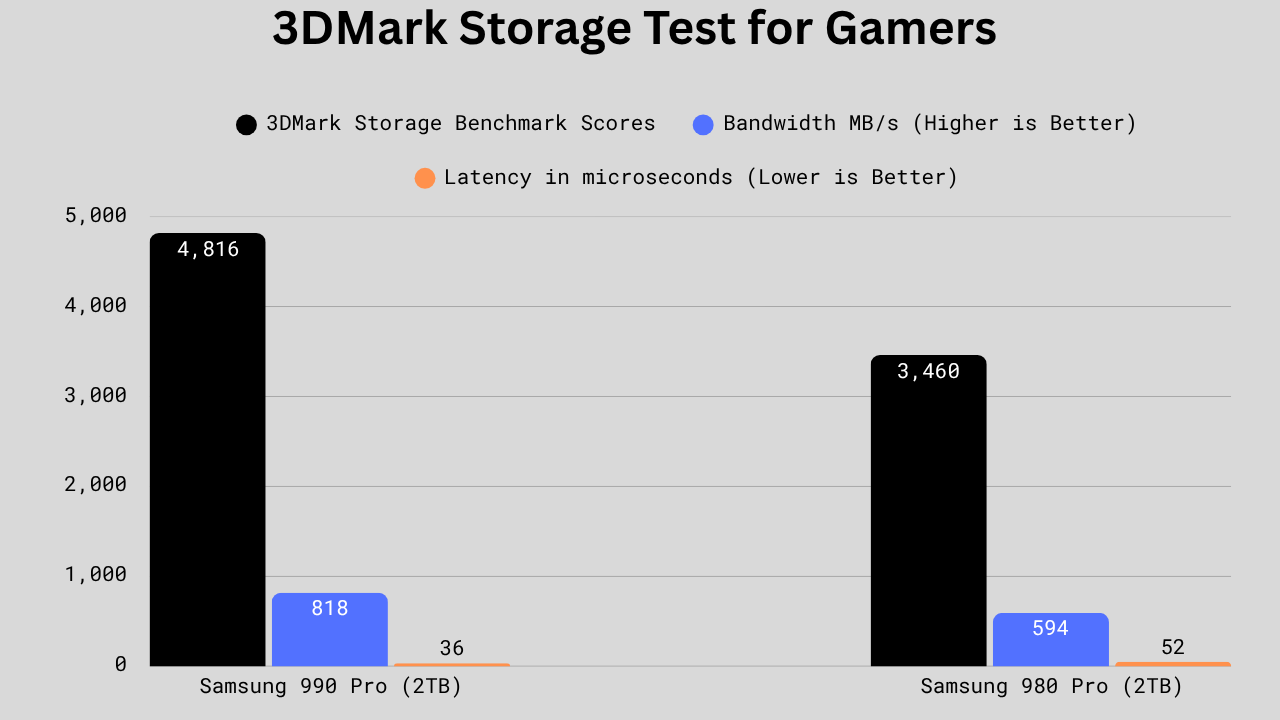
In the 3DMark Storage test, the 990 Pro beats the 980 Pro across the board. The overall score is in favor of 990 Pro, with 4,816 vs 3,460, a difference of around 39.2%. The bandwidth is also higher on the 990 Pro, i.e., 818 MB/s vs 594 MB/s, which is around 37.7% higher. Latency in 990 Pro is 36 µs vs 52 µs in 980 Pro, which is about 30.8% lower (lower is better). Overall, the 990 Pro delivers much higher sustained throughput and noticeably better responsiveness. The 990 Pro is clearly the better choice for heavy content-creation, gaming, video editing, and 3D-related tasks.
CDM Sequential Benchmark
The sequential read/write benchmark on CDM measures the drive’s performance when reading or writing large, contiguous blocks of data. This test is used to understand performance when working with large file sizes. At 1MB file size, we have done these benchmarks are Queue depths of 1 and 8.
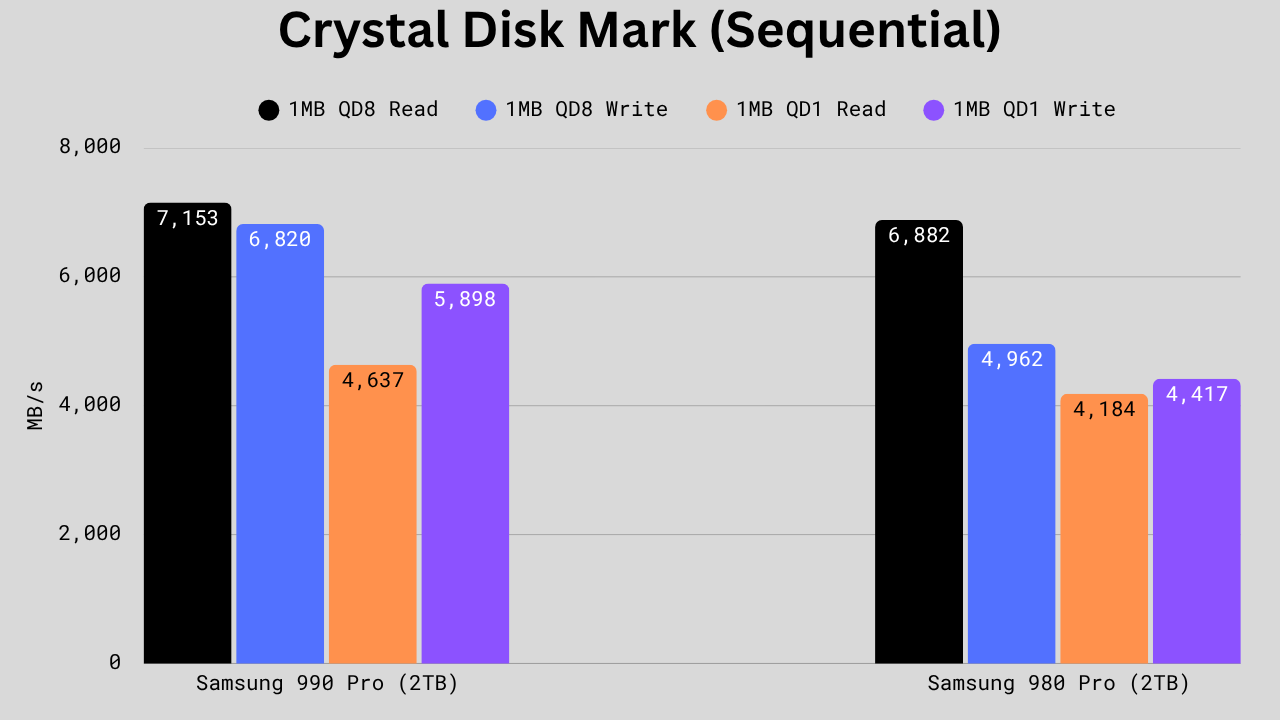
In CrystalDiskMark, the Samsung 990 Pro shows solid gains over the 980 Pro in every category. 1MB QD8 read performance rises from 6,882 MB/s to 7,153 MB/s, about a 3.9% improvement, while 1MB QD8 write jumps from 4,962 MB/s to 6,820 MB/s, a strong 37% increase. At lower queue depths, 1MB QD1 read improves by 10.8% (4,637 vs 4,184 MB/s) and 1MB QD1 write sees a large 33.6% gain (5,898 vs 4,417 MB/s). The 990 Pro is more capable in both sequential and mixed workloads. It is the clear choice for users prioritizing high write speeds and overall throughput, while the 980 Pro still delivers good value for lighter, everyday use.
CDM Random Benchmark Comparison
For the CDM random benchmark, the file size is kept at 4KB at queue depths of 1 and 256, respectively.

In the random 4KB tests, the Samsung 990 Pro again shows evident generational progress, especially under heavy loads. At QD1 read, it reaches 24,502 IOPS vs 22,989 on the 980 Pro, which counts to about a 6.6% improvement. For QD1 write, the 990 Pro is slightly behind at 69,624 vs 71,630, around 2.8% lower, though that difference is negligible in real-world use.
The big gains come at high queue depths: QD256 read jumps from 1,052,521 to 1,400,151 IOPS (~33% faster) and QD256 write from 1,105,025 to 1,513,629 IOPS (~37% faster). These results clearly show that the 990 Pro will help you with multitasking, content creation, and other heavy workloads.
File Reading, Copying, and Writing Benchmark
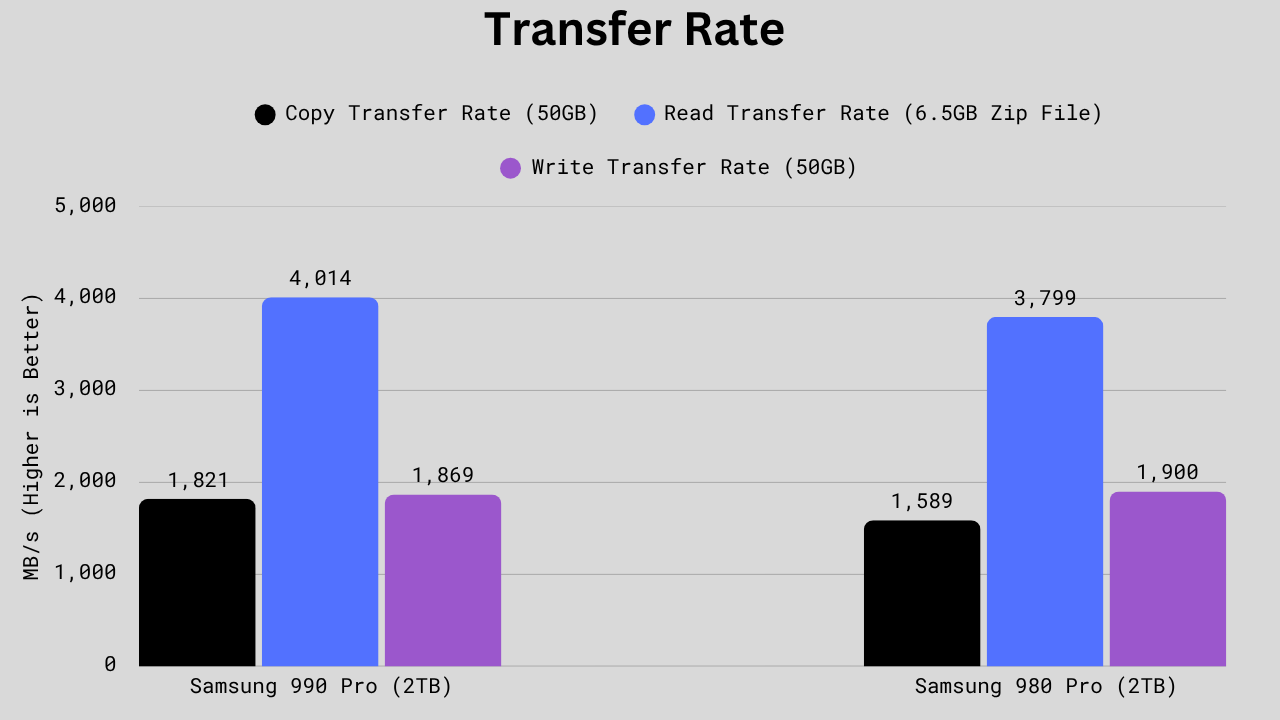
In real-world transfer tests, the Samsung 990 Pro generally performs better, but not across every metric. Its copy transfer rate comes in at 1,821 MB/s versus the 980 Pro’s 1,589 MB/s, a solid 14.6% improvement. The read transfer rate also favors the 990 Pro at 4,014 MB/s vs 3,799 MB/s, about 5.6% faster. However, the write transfer rate is slightly lower, i.e., 1,869 MB/s vs 1,900 MB/s, a 1.6% dip, which is too small to matter in practice. Overall, the 990 Pro moves large and compressed files faster and handles mixed operations more efficiently, while the 980 Pro keeps up well in sustained write tasks. The 990 Pro is the better all-rounder for frequent transfers and productivity workloads.
Power Consumption and Efficiency
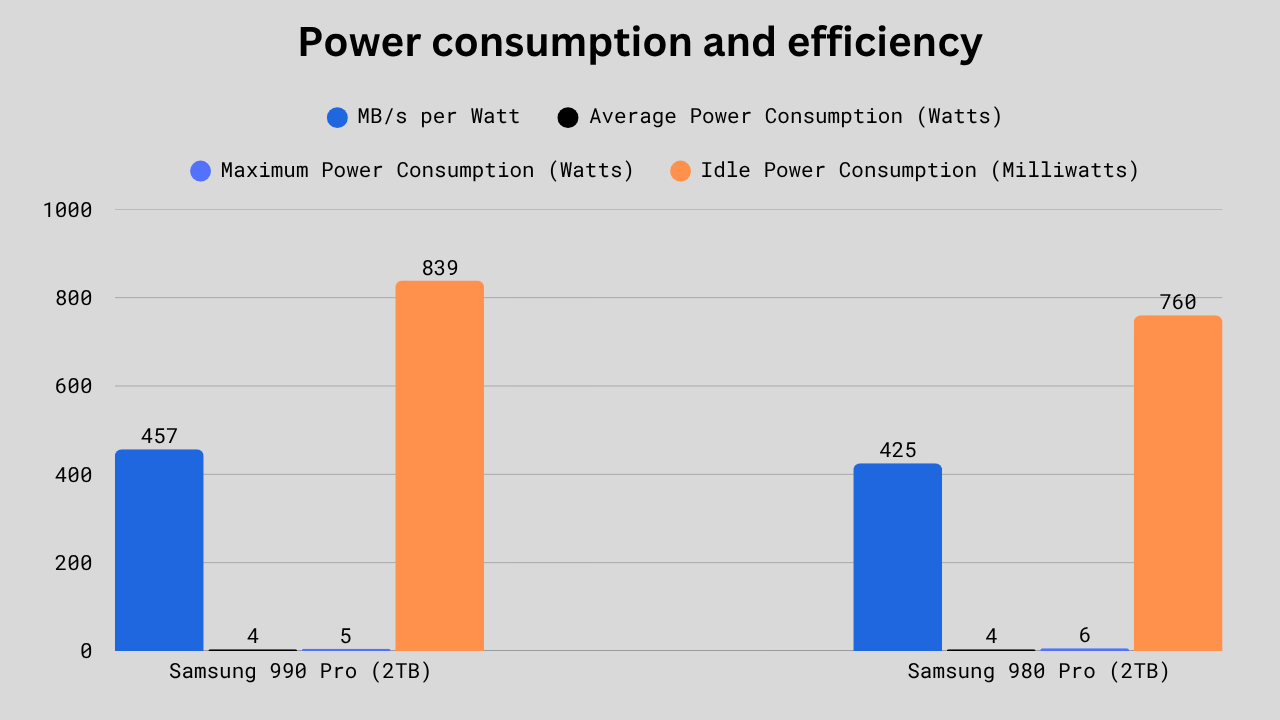
In terms of power efficiency, the Samsung 990 Pro is slightly more optimized overall. It achieves 457 MB/s per watt compared to the 980 Pro’s 425, giving it about a 7.5% efficiency boost. Both drives draw an average of 4W during active use, but the 990 Pro’s maximum power consumption is lower at 5W vs 6W, indicating better control under heavy loads. The idle power draw is actually a bit higher on the 990 Pro (839 mW vs 760 mW, about 10% more), which may translate to marginally more idle heat. Overall, the 990 Pro is more efficient and power-conscious during active operation, while the 980 Pro holds a slight edge in idle operation. For most users, the 990 Pro is still the more balanced and power-optimized option.
TBW, Endurance, and Warranty
| Specificiation | Samsung 990 Pro | Samsung 980 Pro |
|---|---|---|
| TBW (Terabytes Written) | 1TB: 600 TBW 2TB: 1200 TBW 4TB: 2400 TBW | 250GB: 150 TBW 500GB: 300 TBW 1TB: 600 TBW 2TB: 1200 TBW |
| DWPD (Drive Writes per Day) | 0.3 | 0.3 |
| MTBF (Mean Time Between Failure) | 1.5 Million Hours | 1.5 Million Hours |
| Warranty | 5 Years Limited | 5 Years Limited |
In terms of endurance, reliability, and warranty, there is no difference between the two. Also, Samsung SSDs are known for their reliability even in high-demand environments.
Technical Specifications
| Specification | Samsung 990 Pro | Samsung 980 Pro |
|---|---|---|
| Controller | Samsung’s Pascal (S4LV008) | Samsung’s Elpis (S4LV003) |
| Controller Architecture | ARM 32-bit Cortex-R8 | ARM 32-bit Cortex-R8 |
| DRAM Specifications | Samsung’s LPDDR4 DRAM 1TB: 1×1024 MB 2TB: 1×2048 MB 4TB: 1x 4096 MB | Samsung’s LPDDR4 DRAM 250GB: 1x 512 MB 500GB: 1x 512 MB 1TB: 1×1024 MB 2TB: 1×2048 MB |
| SLC Write Cache | 1TB: approx. 114 GB (108 GB Dynamic + 6 GB Static) 2TB: approx. 226 GB (216 GB Dynamic + 10 GB Static) 4TB: approx. 442 GB (432 GB Dynamic + 10 GB Static) | 250GB: approx. 49 GB (45 GB Dynamic + 4 GB Static) 500GB: approx. 94 GB (90 GB Dynamic + 4 GB Static) 1TB: approx. 114 GB (108 GB Dynamic + 6 GB Static) 2TB: approx. 236 GB(230 GB Dynamic + 6 GB Static) |
| NAND Flash | Samsung’s V8 V-NAND | Samsung’s V6 V-NAND |
| Topology | 236-Layers | 128-Layers |
| NAND speed | 2400 MT/s | 1200 MT/s |
| Read Time (tR)/Program Time (tProg) | 40 µs/390 µs | 45 µs/400 µs |
| Die Read Speed | 1600 MB/s | 711 MB/s |
| Die Write Speed | 164 MB/s | 82 MB/s |
| Encryption | AES-256, TCG Opal | AES-128, AES-256, TCG Opal |
| SMART/TRIM/PS5 Support | Yes/Yes/Yes | Yes/Yes/Yes |
| More Information | Check Datasheet | Check Datasheet |
First of all, the 4TB variant, which is missing in the 980 Pro, will be a serious drawback for some users. Then, the Samsung 990 Pro is a clear architectural refinement over the 980 Pro, despite both sharing the same ARM Cortex-R8 controller design. The newer Pascal (S4LV008) controller in the 990 Pro replaces the Elpis (S4LV003) and pairs with significantly faster V8 236-layer V-NAND running at 2400 MT/s, doubling the 980 Pro’s 1200 MT/s V6 128-layer NAND.
Both drives use LPDDR4 DRAM and offer similar cache sizes at comparable capacities, though the 990 Pro’s efficiency and scaling benefit from the newer NAND process. Overall, the 990 Pro represents a significant leap in NAND speed and controller efficiency, making it the better performer for sustained workloads and next-gen systems, while the 980 Pro still provides reliable performance for low-end systems.
Price


Which one should you buy: Samsung 980 Pro or Samsung 990 Pro
It is worth spending money on a good SSD, and the 990 Pro is clearly the winner in terms of performance and specifications. In fact, looking at online marketplaces like Amazon and Newegg, I can get the 990 Pro at a lower price than the 980 Pro. All the benchmarks are in favour of the 990 Pro. A better NAND flash, a good controller, better power efficiency, and lower heat generation are some of the reasons to go for the 990 Pro.
The 980 Pro could be better for those who, first of all, want lower storage variants such as 250GB and 500 GB. The next thing to consider is the price; if you are getting a decent deal and saving a good amount of money compared to the 990 Pro. But, I don’t think you will be able to get the 980 Pro at a good deal. So, I would not recommend the 980 Pro to anybody in most cases.
I hope this helps!



In tables you put 980 on the left, in charts on the right. It’s confusing. I assume it’s your first comparison of two products. Not bad. Keep trying. Will be better next time.
Yeah, you are right. I realized it. I will fix it soon. Thanks
990pro is improved bla bla but it has +10C higher temperatures zen 980pro, zis is funny ja?
Yeah you are right and that is why there is a heatsink version of 990 Pro. Modern SSDs tend to heat up because of the higher throughput. Read more about cooling your SSDs here.