Buying a new laptop or PC used to be simple. Today, one of the biggest decisions is storage, and for many people, the question comes down to this: Is 256 GB enough for Windows 11?
Quick Answer: Is 256 GB Enough for Windows 11?
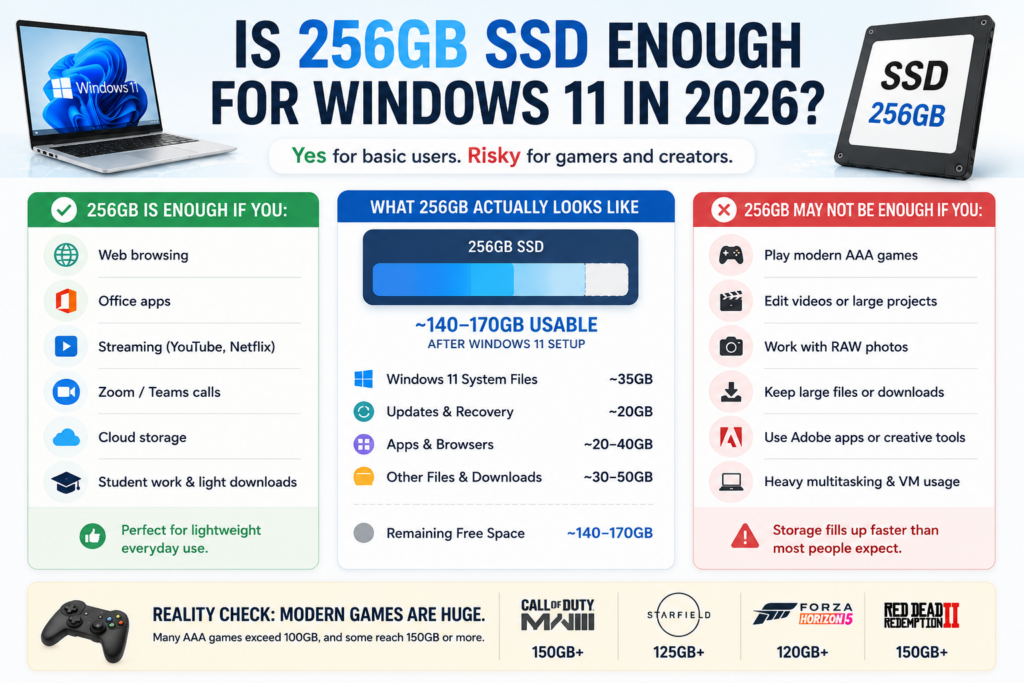
The short answer is yes. For many users, 256GB is still perfectly usable in 2026. If your daily routine mostly involves web browsing, Office apps, streaming, Zoom calls, and light downloads, you can comfortably run Windows 11 on a 256GB SSD.
But that doesn’t mean 256GB is ideal for everyone.
Modern games are enormous, Windows updates keep growing, browsers quietly eat up storage over time, and creative apps can fill a drive faster than most people expect. Whether 256GB feels “fine” or frustrating really depends on how you use your PC.
Here’s what 256GB storage actually looks like in the real world and whether it still makes sense for a Windows 11 computer today.
Who Is 256GB Good For?
For most people, the real issue isn’t whether Windows 11 can run on a 256 GB. It absolutely can. The real question is: Will you still feel comfortable using it a year or two from now?
| User Type | Is 256GB Enough? | Recommendation |
| Web browsing & Office work | Yes | Comfortable for most users |
| Students | Usually | Fine if you use cloud storage |
| Casual gaming | Maybe | Depends on game size |
| AAA gaming | No | 512GB or 1TB recommended |
| Video editing/creators | No | 1TB+ strongly recommended |
| Budget laptops | Yes | Still a reasonable starting point |
| Long-term heavy use | Probably not | 512GB offers more flexibility |
How Much Space Does Windows 11 Actually Use?
One reason this topic confuses people is that a “256GB SSD” doesn’t actually give you 256GB of free usable space.
Before you even install apps, part of the drive is already reserved for the operating system, recovery tools, updates, and system partitions.
Here’s what a typical Windows 11 setup looks like after a clean install:
| Storage Usage | Approximate Space |
| Windows 11 installation | 27GB–35GB |
| Recovery partition | 10GB–20GB |
| System reserved storage | 7GB+ |
| Drivers & OEM software | 5GB–20GB |
| Basic apps & browsers | 10GB–30GB |
In reality, a new 256GB laptop often starts with only around 170GB to 190GB of genuinely usable free space.
And that number shrinks over time.
Windows updates create temporary files. Browsers accumulate cache. Apps grow larger after updates. Downloads pile up. Even if you’re careful, storage usage slowly creeps upward over the life of the machine.
That’s why many people feel like their “256GB SSD filled up surprisingly fast”, even though they barely installed anything massive.
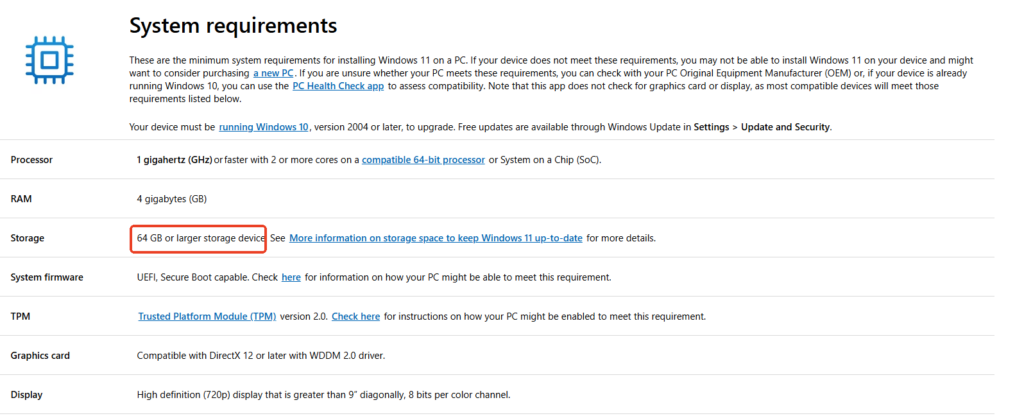
💡Tip: According to the official Microsoft document on Windows 11 Specs and System Requirements, users will need at least a 64 GB storage device for a fresh installation.
Windows 11 vs Windows 10 Storage Usage
If you’re upgrading from Windows 10, the good news is that Windows 11 doesn’t dramatically increase storage usage.
On a clean installation, Windows 11 is typically only 2 gigabytes larger than Windows 10. In day-to-day use, the difference is fairly minor.
So if your current Windows 10 setup already feels comfortable on a 256GB SSD, moving to Windows 11 probably won’t suddenly make your laptop unusable.
However, newer Windows 11 devices often ship with more background services, AI features, manufacturer apps, and recovery partitions than older systems. Over time, that contributes to increased storage pressure — especially on smaller drives.
Is 256GB Enough for Everyday Use?
For average users, yes — 256GB is usually enough.
That includes people who mainly use their computer for:
- Chrome or Edge browsing
- Microsoft Office
- Streaming video
- Zoom or Teams
- PDFs and documents
- Online classes
- Light photo storage
If that sounds like your workflow, you probably won’t spend much time thinking about storage at all.
The biggest advantage of 256GB is that it hits a sweet spot between affordability and usability. It’s dramatically more comfortable than 128GB, but still common in budget and mid-range laptops.
For many students and office users, it’s still the practical minimum in 2026.
For Students: 256GB Is Usually Fine
Students are one of the largest groups searching for this question, especially when buying affordable laptops for school.
In most cases, 256GB is enough for:
- Lecture notes
- Office apps
- Web research
- Zoom classes
- Programming tools like VS Code
- Cloud-based assignments
The biggest factor is whether you rely heavily on local storage.
Students who use OneDrive, Google Drive, or school cloud systems can comfortably stretch a 256GB SSD much further than users who download everything locally.
Computer science students, engineering majors, or media students may eventually outgrow 256GB faster due to development environments, datasets, VMs, or media projects. But for general college use, it remains workable.
Casual Gaming vs AAA Gaming
This is where storage expectations change dramatically.
If you mainly play indie titles, esports games, or smaller downloads, a 256GB SSD can still work. Games like Valorant, Stardew Valley, Terraria, or Hades don’t consume massive amounts of space.
But modern AAA games are another story entirely.
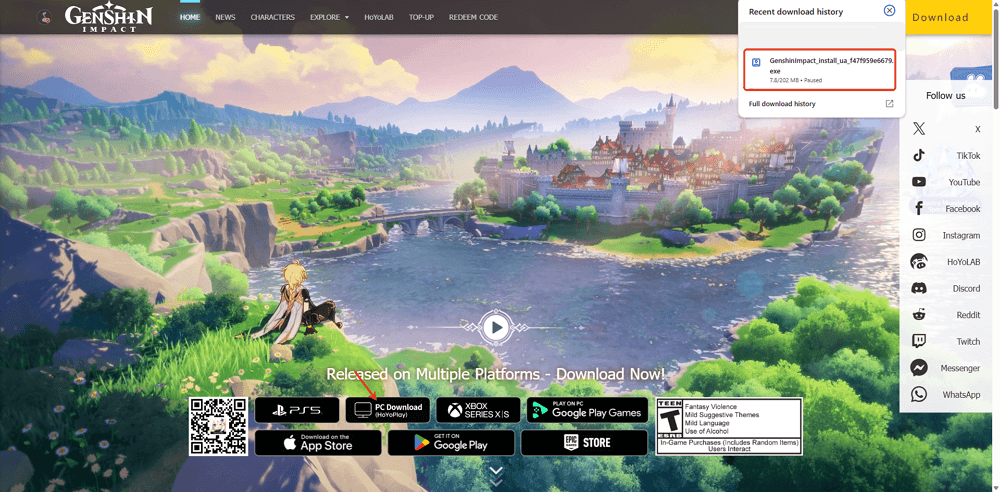
Today, it’s common for a single game to exceed 100 GB. For example, the Genshin Impact PC size in 2026 is typically around 90GB–120GB. Titles like Call of Duty, Baldur’s Gate 3, or Microsoft Flight Simulator can consume enormous amounts of space on a 256GB drive on their own.
Once Windows 11 updates, browser cache, and launchers are included, you may only have enough room for one or two large games before constantly juggling storage.
Technically, it works.
Practically, it becomes annoying.
That distinction matters more than many spec sheets admit.
For Video Editing and Creative Work, 256GB Gets Tight Fast
Creative workloads are where small SSDs start to feel genuinely restrictive.
Applications such as Adobe Premiere Pro, Photoshop, DaVinci Resolve, and After Effects automatically generate large cache files. Even short 4K projects can consume tens or hundreds of gigabytes surprisingly quickly.
An hour of high-bitrate 4K footage alone may exceed 50GB depending on the codec and settings.
And unlike documents or Office files, media workflows create temporary files constantly in the background.
This means a 256GB SSD can feel cramped even if you “don’t store that much”.
For creators, 512GB should realistically be considered the minimum, while 1TB or more provides a much smoother experience.
Why Full SSDs Feel Slower
One thing many buyers don’t realize is that SSDs perform best when they still have free space available.
As a drive approaches capacity, several things start happening behind the scenes:
- Windows has less room for temporary files
- Virtual memory becomes constrained
- Updates have less unpacking space
- Browser cache grows inefficiently
- SSD background maintenance becomes less effective
This is why nearly full SSDs often feel sluggish even when the hardware itself is still healthy.
A good rule of thumb is to keep at least 15% to 20% of your SSD free whenever possible.
On a 256GB drive, that safety margin disappears surprisingly quickly.
That’s one reason why many people say: 256GB is enough… until it suddenly isn’t.
Why 512GB Is Becoming the New Sweet Spot
A few years ago, 256GB felt generous for mainstream laptops.
Today, it feels more like the baseline.
Modern apps are larger. Games are larger. AI features and cloud sync systems create more cached data. Even browsers have become storage-heavy compared to older generations.
That’s why 512GB increasingly feels like the “comfortable” option for Windows 11 laptops in 2026.
Not because everyone truly needs 512GB right now — but because it gives you breathing room.
You stop worrying about every download.
You stop micromanaging storage constantly.
And you reduce the chance that your laptop feels restrictive after only a year or two.
If the price difference between 256GB and 512GB is small, upgrading is usually worth it.
Is 1TB Necessary?
For some people, absolutely.
A 1TB SSD makes sense if you:
- Play multiple AAA games
- Edit videos regularly
- Store large media libraries
- Use virtual machines
- Work with photography or design files
- Want long-term flexibility
But for basic productivity and everyday home use, 1TB is often more luxury than necessity.
A lot depends on your habits.
Some users fill 1TB drives effortlessly. Others barely use 100GB after years of ownership.
256GB vs 512GB: Which Should You Buy?
If you’re shopping for a new laptop, this is usually the real decision.
| Capacity | Best For | Main Drawback |
| 128GB | Extremely light use | Fills quickly |
| 256GB | Average users | Less future-proof |
| 512GB | Most buyers | Slightly higher cost |
| 1TB | Gamers & creators | Often unnecessary for casual users |
Here’s the simplest way to think about it:
- 256GB works
- 512GB feels comfortable
- 1TB feels worry-free
If your budget allows it, 512GB is the safer long-term choice for most Windows 11 laptops today.
Can You Upgrade Your SSD Later?
Fortunately, storage isn’t always permanent.
Many Windows laptops still allow SSD upgrades, especially models using standard NVMe drives. Desktop PCs are even easier to expand.
If your laptop supports upgrades, starting with 256GB now and upgrading later can be a reasonable strategy.
There are several common options:
- Replace the internal SSD with a larger one
- Add a secondary SSD (on supported systems)
- Use an external SSD for games or media
- Move files to cloud storage
External SSDs are especially useful for creators and gamers who need extra storage without replacing their internal drive right away.
Cloning Your SSD vs Reinstalling Windows
When upgrading to a larger SSD, most users choose between two approaches:
Clean install
This gives you a fresh copy of Windows 11, free of clutter and unnecessary files. It’s cleaner, but requires reinstalling apps and setting everything up again.
Clone the existing SSD
Cloning copies your current Windows installation, apps, settings, and files directly to the new drive.
For most non-technical users, cloning is usually faster and easier — especially when upgrading from a cramped 256GB SSD to a larger drive.
This has become increasingly common as SSD prices continue to fluctuate and many users outgrow their original storage faster than expected.
Should You Partition a 256GB SSD?
In most cases, no.
Older PC advice often recommended splitting drives into multiple partitions for organization. Today, that usually creates more problems than benefits on smaller SSDs.
The issue is simple:
If one partition fills up while another still has free space, Windows can encounter update failures, app installation issues, or low-storage warnings, even though the overall drive isn’t actually full.
Modern Windows systems automatically create the partitions they need, including EFI and recovery partitions.
For most users, organizing files with folders, cloud storage, or secondary drives is much simpler than manually splitting a 256GB SSD into multiple sections.
Final Verdict: Is 256GB Enough for Windows 11?
Yes — for many people, 256GB is still enough for Windows 11 in 2026.
If you mainly browse the web, use Office apps, stream content, attend classes, or handle everyday productivity tasks, a 256GB SSD remains perfectly usable.
But there’s a difference between “usable” and “comfortable”.
If you install modern games, work with large files, or simply want your laptop to feel less restrictive over the next several years, 512GB is the better long-term investment.
In the end, the best storage size isn’t about what Windows 11 technically requires.
It’s about how much friction you want in your daily experience.
And for many users today, that’s the real reason 512GB is quietly becoming the new standard.