Affiliate Disclosure: This post may include affiliate links. If you click and make a purchase, I may earn a small commission at no extra cost to you.
After my testing on different hard drives, I have found these numbers and then verified through several platforms on the internet. So, there are ranges of power consumption in hard drives under different scenarios. The type of hard drive also impact how much power it will consume.
A 7200 RPM hard drive would normally consume 15-22W for 5-10 seconds during startup. It will then idle at around 5-7 watts. The average power consumption during read/write tasks is approximately 8-12 watts, with a maximum of up to 16 watts. In sleep or standby mode, it will consume 0.6-1.8 watts.
A 5400 RPM hard drive can consume 10-18W for 5-10 seconds during startup. It will then idle at around 4-6 watts. The average power consumption during read/write tasks will be around 6-9 watts, with a maximum of 12 watts. In sleep or standby mode, you can expect near around 0.5-1.5 watts.
This study from Signal65 verifies these numbers:
- Idle: ~4.3–6.5 W depending on model
- Active read/write: ~7–9.5 W
- Spin-up: peaks at 12–15 W
However, they indicated that there is a significant difference in the power consumption of consumer and enterprise SSDs. Enterprise SSDs are designed for high-speed operations (read/write IOPS, throughput) that require more power-hungry controllers and DRAM caches.
Note: The numbers are derived from various studies, some of which are cited at the end of this article.
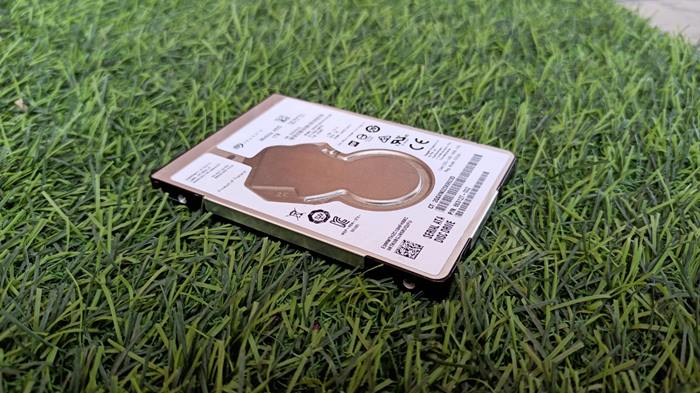
HDD Power Consumption
Common hard drive power consumption numbers
Here’s an improved and expanded version of the table with additional details and context:
| Drive Type | Read / Write (W) | Idle (W) | Standby / Sleep (W) |
|---|---|---|---|
| HDD (2.5″ SATA) | 1.5 – 3.5 | 0.6 – 1.2 | 0.2 – 0.8 |
| HDD (3.5″ SATA) | 6 – 12 | 4 – 7 | 0.5 – 2.0 |
| HDD (Enterprise) | 8 – 15 | 6 – 10 | 0.8 – 2.5 |
| SSD (SATA-3) | 2 – 5 | 0.2 – 0.6 | 0.05 – 0.2 |
| SSD (NVMe Gen 5) | 6 – 12 | 0.3 – 1.0 | 0.05 – 0.2 |
You can say that the 2.5″ mobile hard drives (generally found in laptops) are the most power-efficient. But they get less work done over time. So, there are always some pros and cons. In comparison, the SSDs consume less power but get more work done quickly. However, the major drawback is the excessive heat they generate.
The RPM of a hard drive is a major deciding factor of how much power will it consume.
| RPM Class | Read / Write (W) | Idle (W) | Standby / Sleep (W) |
|---|---|---|---|
| 5400 RPM HDD | 5 – 8 | 3.5 – 5 | 0.4 – 1.2 |
| 7200 RPM HDD | 7 – 10 | 4.5 – 6.5 | 0.6 – 1.5 |
| 10K–15K RPM HDD (Enterprise) | 9 – 15 | 6.5 – 10 | 1.0 – 2.5 |
- Higher rotational speeds require more power for both idle and active states.
- SSDs consume less power compared to hard drives.
- 7200 RPM drives provide a good balance between performance and power consumption.
Hard Drive Power Consumption Calculator
Let’s calculate how much power a hard drive or multiple hard drives under different workloads can consume and how much it would cost you. Also, this tool compares it with the SSD power consumption.
HDD Power Calculator
Factors Affecting Power Consumption of Hard Drives
As we discussed earlier, several factors influence the power consumption of hard drives. Let's talk about them.
1. Rotational Speed
The spindle motor is the most power-hungry component in a hard drive. It can use around 80% of the total power consumed by the hard drive during heavy workloads.
| RPM (Revolutions per Minute) | Power Consumption (Watts) |
|---|---|
| 5,400 | 4.5 - 7.5 |
| 7,200 | 6.5 - 9.5 |
| 10,000 | 8.0 - 12.0 |
| 15,000 | 10.0 - 15.0 |
2. Drive Capacity/Size
More storage capacity in hard drives requires more surface area of the magnetic platters. So, instead of increasing the size of the platters, manufacturers utilize multiple platters. This increases the load on the spindle motor, and we have to use various read/write heads. There is some extra load on the circuitry, but not very significant.
3. Form Factor
There are two types of Hard Drive form factors available in the market: 3.5-inch and 2.5-inch. The 3.5-inch hard drive consumes more power because of the bigger spindle motor size, higher RPM (generally), higher storage capacities, and cooling requirements.
4. Interface Type
The storage interface determines how fast the data can move. The fastest interface for hard drives is SATA-3, which maxes out at a read/write speed of 600 MB/s. The older interfaces, such as SATA-2, 1, and ATA, were slower and efficient. SATA also features power management capabilities that enable the drives to enter a lower power state when not in use.
5. Activity Level
When you are reading or writing data, the power consumption will be higher. When the drive is idle, the power consumption can even go below 1 watt.
6. Temperature
Higher temperature means more resistance in the circuits and hence more power ris equired to do the same job.
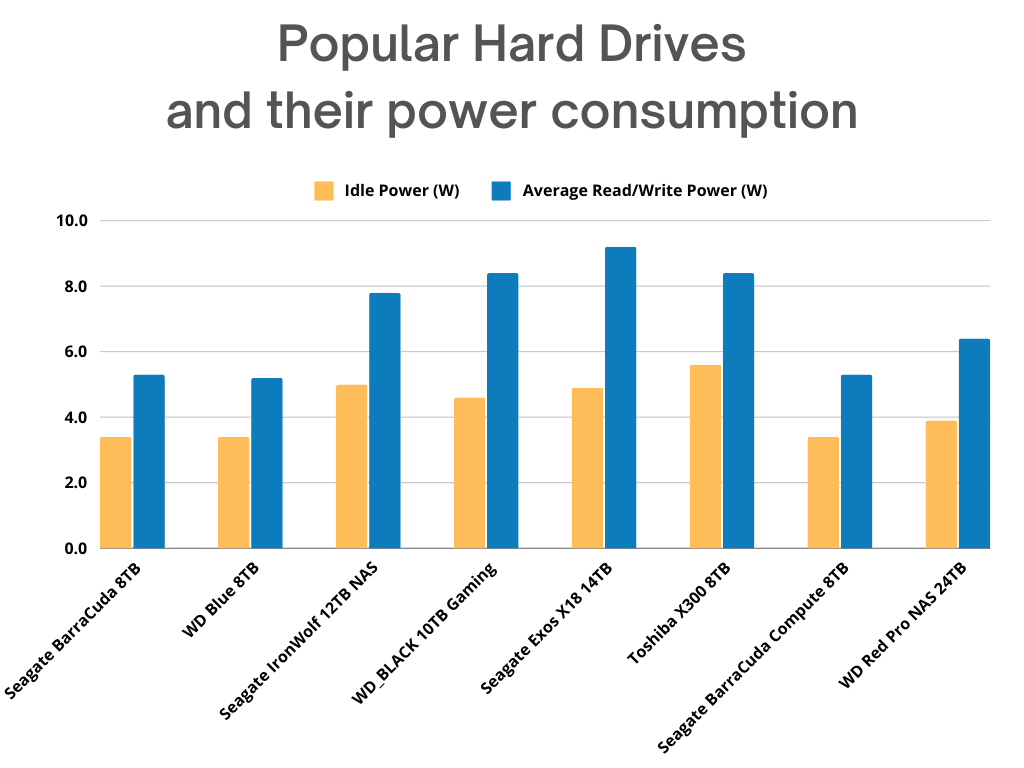
Popular Hard Drives And Their Power Consumption
Why Does Hard Drive Power Consumption Matter?
Hard Drive power consumption isn't as massive as CPU and GPU power consumption. These are comparatively power-efficient devices as there are no huge processes and calculations going on. It is just a storage device for our computers. But there are some reasons the hard drive's power consumption may matter to you. These are Battery life (Laptops), Heat Generation (more power means more heat), noise and vibrations, and environmental impacts.
These may sound like generic terms, but when you combine multiple drives, especially on an enterprise level, the numbers and impacts will become huge.
How to Optimize Hard Drive Power Consumption?
1. Utilizing Power Management Settings
For Windows:
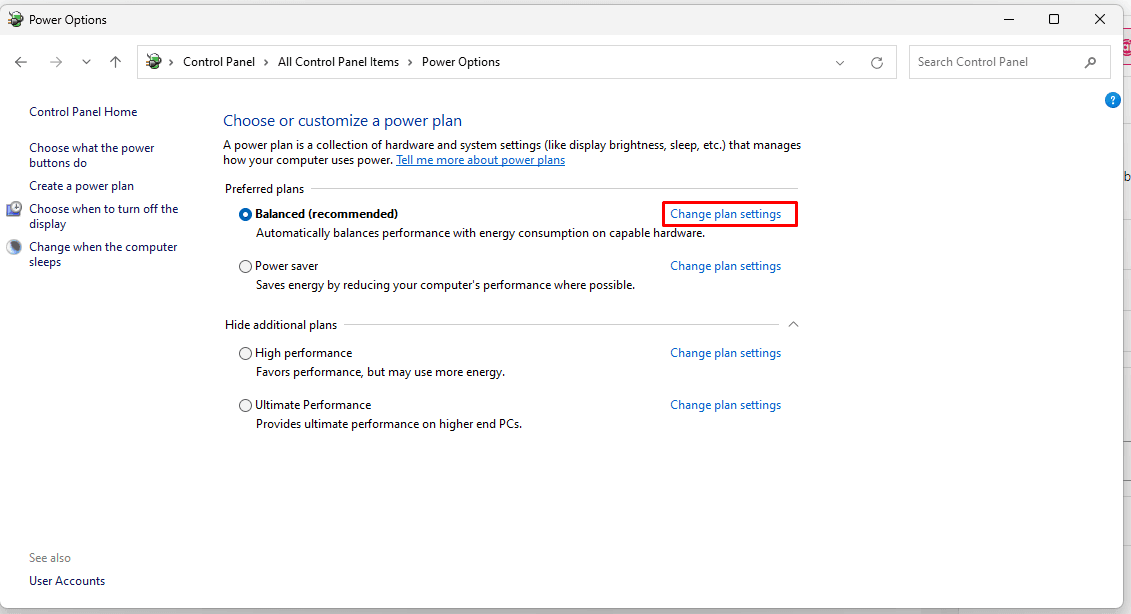
- Go to Control Panel > Power Options.

- Choose a power plan and click on "Change plan settings".
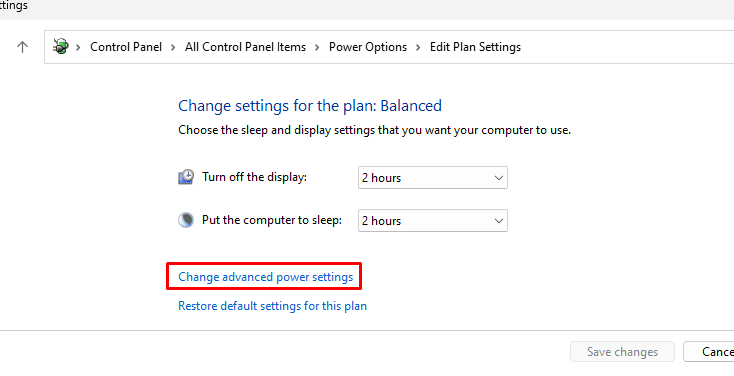
- Click on "Change advanced power settings".
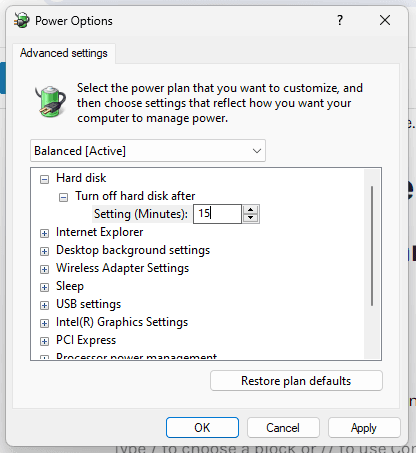
- Expand the "Hard disk" option and set "Turn off hard disk after" to the desired time. Usually, setting it to 15 minutes of inactivity is good.
For macOS:
- Go to System Preferences > Energy Saver.
- Adjust the "Turn display off after" and "Put hard disks to sleep when possible" sliders.
For Linux:
- Install
hdparmif not already installed. - Run
sudo hdparm -S 240 /dev/sdX, where "240" is the idle time in seconds before the disk goes to sleep and "/dev/sdX" is your hard drive. (Note: The default value of 240 equals 20 minutes. Adjust as necessary.)
Do Hard Drives consume more power than SSDs?
During heavy read/write operations, SSDs consume more power than hard drives because their speed is higher. However, when we examine the overall energy required for any task to occur, the total generally remains similar. Most of the time, SSDs prove to be more efficient because those peaks in performance and power consumption are there for short periods.
On the other hand, hard drives may use less power even during read/write operations, but these tasks will take more than double or triple the time to complete (in the case of SATA SSDs only).
So, it's true that there are spikes in SSD power consumption, but that doesn't mean SSDs are inefficient; it's just that they need more power to do high-speed operations.
What makes SSDs consume a lot of power (up to 20 Watts in Gen 5.0 SSDs) is their design. The power is stored in the form of an electric charge in the floating gate transistors. When the data write speed is higher, more charge has to be transferred. Even when the data is read from these transistors, the voltage is applied to the control gate to form a channel and check the state of the transistor. All this requires a huge amount of current because there are millions and billions of cells.
This isn't the case with the hard drive because there is no direct electricity involved in data storage. Electricity is used indirectly to rotate the motor and manage comparatively small circuitry.
Resources:
An Analysis of Hard Drive Energy Consumption
Modeling Hard Drive Power Consumption
Accurate and Low-Overhead Process-level Energy Estimation for Modern Hard Disk Drives
![How to Fix USB Drive not Recognized? [8 Easy Methods]](https://storedbits.com/wp-content/uploads/2025/03/usb-drive-not-detected-768x444.jpg)